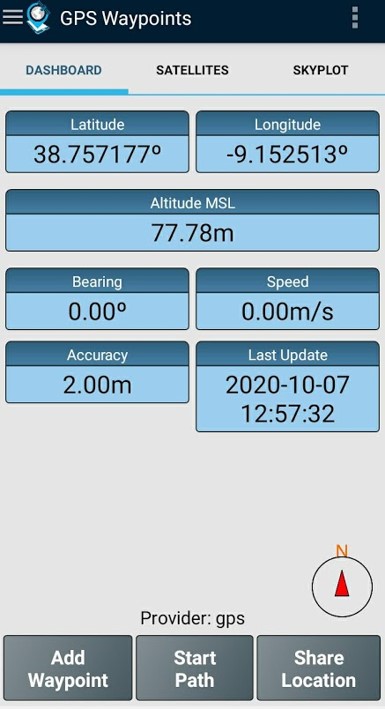
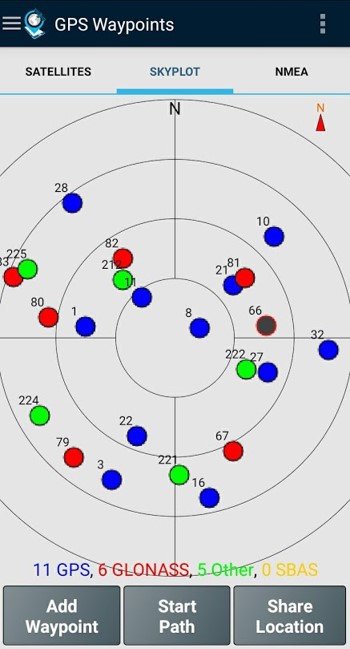
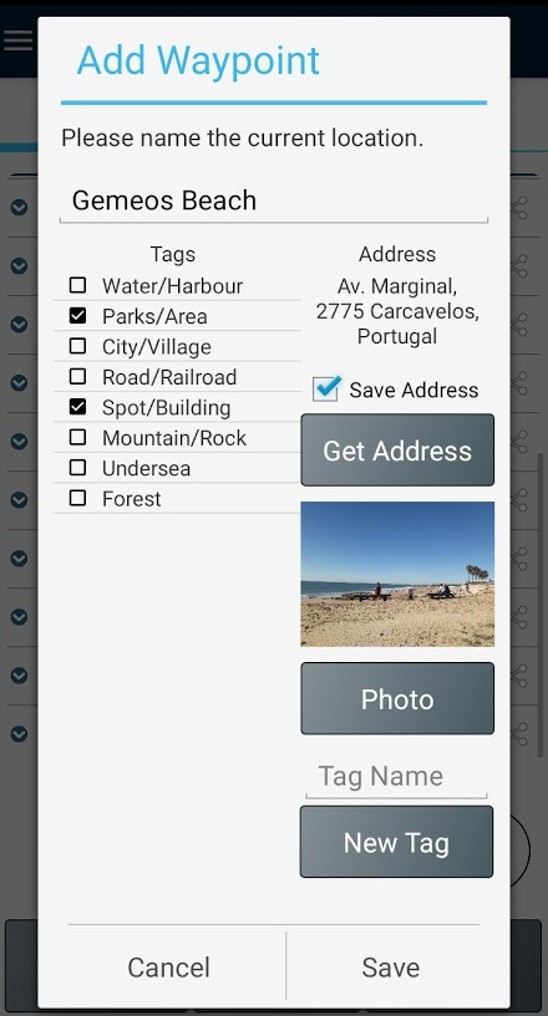
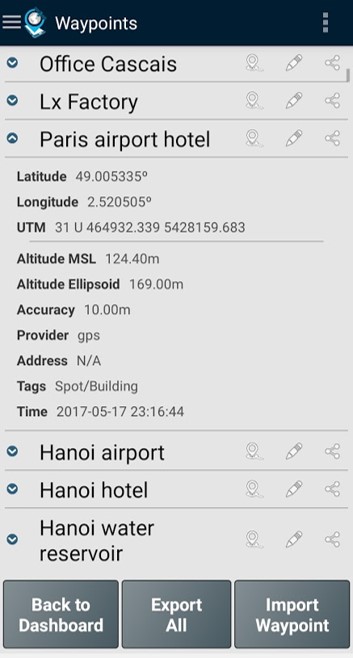
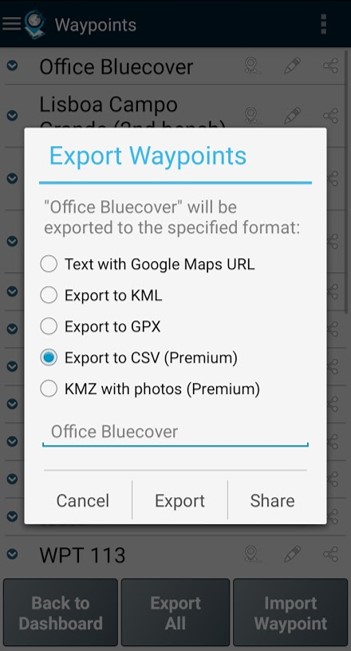
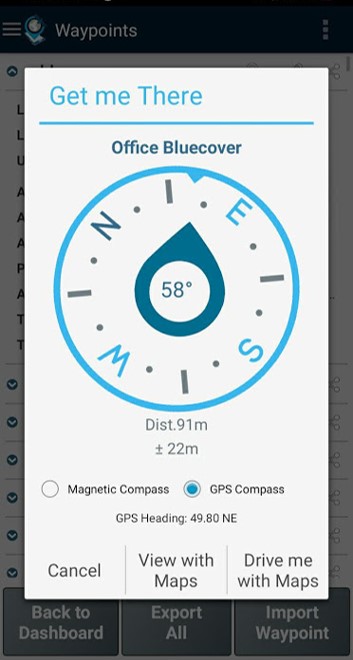
Strumento multiuso per la mappatura e il rilievo, sia per uso professionale che personale. Lo strumento è prezioso in diverse attività di rilievo professionale del territorio, tra cui agricoltura, gestione forestale, manutenzione delle infrastrutture (ad esempio strade e reti elettriche), pianificazione urbana e immobiliare e mappatura delle emergenze. Viene utilizzato anche per attività personali all'aperto, come escursionismo, corsa, camminata, viaggi e geocaching. L'applicazione raccoglie Punti (come punti di interesse) e Percorsi (sequenze di punti) per eseguire attività di mappatura e rilievo. I Punti, acquisiti con informazioni di precisione, possono essere classificati dall'utente con tag specifici o caratterizzati da foto. I Percorsi vengono creati come sequenza temporale di Punti appena acquisiti (ad esempio per registrare una traccia) o in alternativa con Punti esistenti (ad esempio per creare un percorso). I Percorsi consentono di misurare distanze e, se chiusi, formano Poligoni che consentono la determinazione di aree e perimetri. Sia i Punti che i Percorsi possono essere esportati in file KML, GPX e CSV e quindi elaborati esternamente con uno strumento geospaziale. L'applicazione utilizza il ricevitore GPS interno del dispositivo mobile (in genere con precisioni >3 m) o, in alternativa, consente agli utenti professionali di ottenere precisioni maggiori con un ricevitore GNSS esterno Bluetooth compatibile con il formato di flusso NMEA (ad esempio, ricevitori RTK con precisione centimetrica). Di seguito sono riportati alcuni esempi dei ricevitori esterni supportati. L'applicazione include le seguenti funzionalità: - Acquisizione della posizione corrente con precisione e informazioni di navigazione; - Fornitura dei dettagli dei satelliti attivi e visibili (GPS, GLONASS, GALILEO, BEIDOU e altri); - Creazione di punti con informazioni di precisione, classificazione tramite tag, allegazione di foto e conversione delle coordinate in un indirizzo leggibile dall'uomo (geocodifica inversa); - Importazione di punti da coordinate geografiche (latitudine, longitudine) o tramite la ricerca di un indirizzo stradale/punto di interesse (geocodifica); - Creazione di percorsi acquisendo manualmente o automaticamente sequenze di punti; - Importazione di percorsi da punti esistenti; - Crea temi di rilievo con tag personalizzati per la classificazione di punti e percorsi - Ottieni indicazioni stradali e distanze dalla posizione corrente a punti e percorsi utilizzando una bussola magnetica o GPS; - Esporta punti e percorsi in formato file KML e GPX; - Condividi i dati con altre applicazioni (ad esempio Dropbox/Google Drive); - Configura la sorgente di posizionamento per il ricevitore interno o utilizzando un ricevitore esterno. L'abbonamento Premium include le seguenti funzionalità professionali: - Backup e ripristino dei dati utente (consente anche il trasferimento dei dati da un dispositivo all'altro); - Esporta waypoint e percorsi in formato file CSV; - Esporta waypoint con foto in file KMZ - Importa più punti e percorsi da file CSV e GPX; - Ordina e filtra punti e percorsi in base a data di creazione, nome e prossimità; - Analisi del segnale satellitare e rilevamento delle interferenze. La funzione Mappe è una funzionalità extra a pagamento che consente di selezionare e visualizzare punti, percorsi e poligoni su Open Street Maps. Oltre al ricevitore mobile interno, la versione attuale è compatibile con i seguenti ricevitori esterni: Bad Elf GNSS Surveyor; Garmin Glo; Navilock BT-821G; Qstarz BT-Q818XT; Trimple R1; ublox F9P. Se hai testato con successo l'applicazione con un altro ricevitore esterno, ti preghiamo di fornirci il tuo feedback come utente o produttore per ampliare questo elenco. Per ulteriori informazioni, visita il nostro sito (https://www.bluecover.pt/gps-waypoints) e scopri i dettagli della nostra offerta completa: - Funzionalità Free, Premium e Mappe (https://www.bluecover.pt/gps-waypoints/features) - Ricevitori GISUY (https://www.bluecover.pt/gisuy-gnss-receiver/) - Enterprise (https://www.bluecover.pt/gps-waypoints/enterprise-version/)
Aggiornamento GPS Waypoints 4.1
Version 4.1 - Virtual Assistant on About - Import the Points and their Tags from file - Various Fixes (import from CSV, Add Waypoint with photos, Path charts speed) - Replace media permission by Media Picker from AndroidX - Removed P2P and GPS Enterprise hyperlinks Version 4.0 - Filter count and Export to handle large number of geoitems - Full landscape support - Export Paths to CAD file in DXF format (Premium) - Import points with numeric tags from CSV
Version 4.1 - Virtual Assistant on About - Import the Points and their Tags from file - Various Fixes (import from CSV, Add Waypoint with photos, Path charts speed) - Replace media permission by Media Picker from AndroidX - Removed P2P and GPS Enterprise hyperlinks Version 4.0 - Filter count and Export to handle large number of geoitems - Full landscape support - Export Paths to CAD file in DXF format (Premium) - Import points with numeric tags from CSV
Version 4.1 - Virtual Assistant on About - Import the Points and their Tags from file - Various Fixes (import from CSV, Add Waypoint with photos, Path charts speed) - Replace media permission by Media Picker from AndroidX - Removed P2P and GPS Enterprise hyperlinks Version 4.0 - Filter count and Export to handle large number of geoitems - Full landscape support - Export Paths to CAD file in DXF format (Premium) - Import points with numeric tags from CSV
Version 4.1 - Virtual Assistant on About - Import the Points and their Tags from file - Various Fixes (import from CSV, Add Waypoint with photos, Path charts speed) - Replace media permission by Media Picker from AndroidX - Removed P2P and GPS Enterprise hyperlinks Version 4.0 - Filter count and Export to handle large number of geoitems - Full landscape support - Export Paths to CAD file in DXF format (Premium) - Import points with numeric tags from CSV
Version 4.1 - Virtual Assistant on About - Import the Points and their Tags from file - Various Fixes (import from CSV, Add Waypoint with photos, Path charts speed) - Replace media permission by Media Picker from AndroidX - Removed P2P and GPS Enterprise hyperlinks Version 4.0 - Filter count and Export to handle large number of geoitems - Full landscape support - Export Paths to CAD file in DXF format (Premium) - Import points with numeric tags from CSV
Version 4.1 - Virtual Assistant on About - Import the Points and their Tags from file - Various Fixes (import from CSV, Add Waypoint with photos, Path charts speed) - Replace media permission by Media Picker from AndroidX - Removed P2P and GPS Enterprise hyperlinks Version 4.0 - Filter count and Export to handle large number of geoitems - Full landscape support - Export Paths to CAD file in DXF format (Premium) - Import points with numeric tags from CSV
Version 4.00 - Minor fixes - Filter count and Export optimization to handle large number of geoitems - Full landscape support - Export Paths to CAD file in DXF format (Premium) - Local themes with numeric tags example - Import points with numeric tags from CSV - User interface general upgrade Version 3.18 - Improvements on thematic tagging (numeric, load fix) - Web map Layers improvement with historic visualization (Maps) - Automatic updates of current location on map (Maps)
Version 4.00 - Minor fixes - Filter count and Export optimization to handle large number of geoitems - Full landscape support - Export Paths to CAD file in DXF format (Premium) - Local themes with numeric tags example - Import points with numeric tags from CSV - User interface general upgrade Version 3.18 - Improvements on thematic tagging (numeric, load fix) - Web map Layers improvement with historic visualization (Maps) - Automatic updates of current location on map (Maps)
Version 4.00 - Minor fixes - Filter count and Export optimization to handle large number of geoitems - Full landscape support - Export Paths to CAD file in DXF format (Premium) - Local themes with numeric tags example - Import points with numeric tags from CSV - User interface general upgrade Version 3.18 - Improvements on thematic tagging (numeric, load fix) - Web map Layers improvement with historic visualization (Maps) - Automatic updates of current location on map (Maps)
Version 4.00 - Minor fixes - Filter count and Export optimization to handle large number of geoitems - Full landscape support - Export Paths to CAD file in DXF format (Premium) - Local themes with numeric tags example - Import points with numeric tags from CSV - User interface general upgrade Version 3.18 - Improvements on thematic tagging (numeric, load fix) - Web map Layers improvement with historic visualization (Maps) - Automatic updates of current location on map (Maps)
Version 3.18 - Minors updates on About view - Improvements on thematic tagging (numeric, load fix) - Web map Layers improvement with historic visualization (Maps) - Automatic updates of current location on map (Maps) Version 3.17 - Tags enhanced with numeric atribute values (e.g. height 32) - New features: Follow a Route and Follow Polygon - Ge Me There with current and target coordinates - EO images refactoring (Maps)
Version 3.18 - Minors updates on About view - Improvements on thematic tagging (numeric, load fix) - Web map Layers improvement with historic visualization (Maps) - Automatic updates of current location on map (Maps) Version 3.17 - Tags enhanced with numeric atribute values (e.g. height 32) - New features: Follow a Route and Follow Polygon - Ge Me There with current and target coordinates - EO images refactoring (Maps)
Version 3.18 - Minors updates on About view - Improvements on thematic tagging (numeric, load fix) - Web map Layers improvement with historic visualization (Maps) - Automatic updates of current location on map (Maps) Version 3.17 - Tags enhanced with numeric atribute values (e.g. height 32) - New features: Follow a Route and Follow Polygon - Ge Me There with current and target coordinates - EO images refactoring (Maps)
Version 3.17 - EO images improvements (Maps) Version 3.16 - Autopath improvements (inc trigger by distance) - Edit Points and Paths on map (Maps) - High resolution Satellite basemap added (Maps) - Ruler from map with imperial metrics (Maps) - EO images improvements (Maps)
Version 3.17 - EO images improvements (Maps) Version 3.16 - Autopath improvements (inc trigger by distance) - Edit Points and Paths on map (Maps) - High resolution Satellite basemap added (Maps) - Ruler from map with imperial metrics (Maps) - EO images improvements (Maps)
Version 3.17 - EO images improvements (Maps) Version 3.16 - Autopath improvements (inc trigger by distance) - Edit Points and Paths on map (Maps) - High resolution Satellite basemap added (Maps) - Ruler from map with imperial metrics (Maps) - EO images improvements (Maps)
Version 3.17 - EO images improvements (Maps) Version 3.16 - Autopath improvements (inc trigger by distance) - Edit Points and Paths on map (Maps) - High resolution Satellite basemap added (Maps) - Ruler from map with imperial metrics (Maps) - EO images improvements (Maps)
APKFab.com e il link per il download di questa app sono sicuri al 100%. Tutti i link per il download delle app elencate su APKFab.com provengono da Google Play Store o sono inviati dagli utenti. Per le app da Google Play Store, APKFab.com non le modificherà in alcun modo. Per le app inviate dagli utenti, APKFab.com verificherà la sicurezza della firma APK prima di rilasciarle sul nostro sito web.