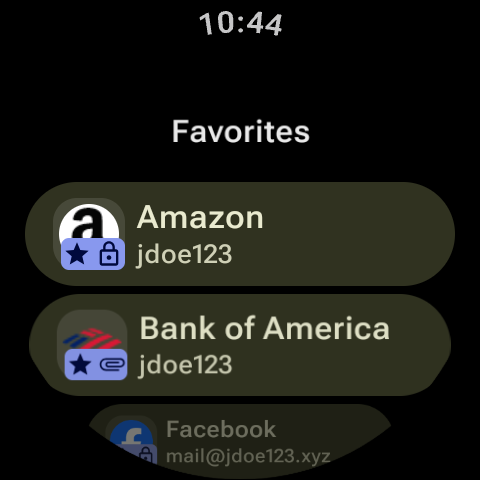
Keyguard é um gerenciador de senhas seguro e agradável de usar. Funciona offline e sincroniza com Bitwarden® e KeePass (KDBX). Pode ser usado com qualquer instalação do Bitwarden®️. Este produto não está associado ao projeto do Bitwarden nem ao Bitwarden, Inc. Bitwarden®️ é uma marca comercial registrada do Bitwarden Inc. Essenciais • Preenchimento automático: Preencha nomes de usuário e senhas em apps e navegadores e salve novos logins ao entrar. • Chaves de acesso: Crie e use chaves de acesso para entrar em apps, navegadores e em um computador próximo. • Senhas de uso único: Guarde chaves de autenticação nos logins e obtenha códigos TOTP, HOTP, Steam e mOTP. • Gerador: Crie senhas, frases-senha, nomes de usuário, aliases de e-mail e chaves SSH e GPG com suas próprias listas de palavras. • Pesquisa: Encontre itens com frases, exclusões e qualificadores de campo. Salve os filtros mais usados. Segurança • Torre de Vigia: Detecte senhas vazadas, reutilizadas e fracas, contas comprometidas, falta de autenticação de dois fatores, sites inseguros e itens duplicados ou prestes a expirar. • Desbloqueio: Use a senha do app ou um método mais rápido, como biometria, uma YubiKey ou uma chave de segurança. • Agente SSH: Autentique-se em servidores e serviços Git com chaves SSH que nunca saem do cofre. • Agente e ferramentas GPG: Assine e descriptografe em outros apps ou no Keyguard com chaves GPG que nunca saem do cofre. Seus dados • Múltiplas contas: Entre em várias contas Bitwarden e KeePass e veja seus itens em um só cofre. • Servidores próprios: Conecte-se ao seu servidor com login único, certificados de cliente e cabeçalhos HTTP personalizados. • Offline: Veja o cofre e adicione ou edite itens sem conexão. As alterações são mescladas campo a campo na próxima sincronização. • Importação: Transfira suas senhas de navegadores e outros gerenciadores de senhas. • Troca de credenciais: Transfira senhas e chaves de acesso diretamente entre o Keyguard e outros apps no dispositivo. • Exportação: Salve itens e anexos em um arquivo ZIP criptografado ou banco de dados KeePass. • Backups: Guarde cópias versionadas do cofre em uma pasta, servidor WebDAV ou armazenamento compatível com S3. • Anexos: Envie arquivos ao cofre e visualize imagens, textos e arquivos ZIP sem salvá-los no disco. • Sends: Compartilhe texto ou um arquivo por um link que expira, com senha ou limite de acesso opcionais. Ferramentas avançadas • Wear OS: Consulte itens e senhas de uso único no relógio e entre em apps do relógio. • Dispositivos vinculados (beta): Sincronize configurações do app, como encaminhadores de e-mail e listas de palavras, diretamente entre dispositivos. • Recursos avançados: Ações em lote, espaços reservados em campos e substituições de URL. • Interface: Design Material You com temas claro, escuro e preto. Keyguard também está disponível para Linux, macOS e Windows. Código-fonte: https://github.com/AChep/keyguard-app Como o app usa as permissões declaradas • QUERY_ALL_PACKAGES: Lista os apps instalados ao vincular um app a um item e mostra o nome e o ícone do app vinculado.
Atualização de Keyguard 3.9.0
Import Diceware wordlists and add, edit, or delete individual words in the generator, which now automatically clears older usage history after a configurable number of days. Autofill now allows blocking URIs from save requests, while concealed password fields display badges for Caps Lock and non-English keyboard layouts. Predictive back navigation incorporates a Y-axis parallax effect, and server URLs with single-label hostnames are now supported for Bitwarden accounts.
Import Diceware wordlists and add, edit, or delete individual words in the generator, which now automatically clears older usage history after a configurable number of days. Autofill now allows blocking URIs from save requests, while concealed password fields display badges for Caps Lock and non-English keyboard layouts. Predictive back navigation incorporates a Y-axis parallax effect, and server URLs with single-label hostnames are now supported for Bitwarden accounts.
Import Diceware wordlists and add, edit, or delete individual words in the generator, which now automatically clears older usage history after a configurable number of days. Autofill now allows blocking URIs from save requests, while concealed password fields display badges for Caps Lock and non-English keyboard layouts. Predictive back navigation incorporates a Y-axis parallax effect, and server URLs with single-label hostnames are now supported for Bitwarden accounts.
The generator now adds support for ImprovMX, Migadu, and mailcow email forwarders, while GPG and SSH settings screens hide the Custom and Misc filter sections. Keystore outages are resolved so encrypted storage is not wiped and vault data is not treated as lost. Additionally, Watchtower security checks no longer remain at zero after an update or reinstall, and GPG keys import successfully when a child key password differs from the main key password.
The generator now adds support for ImprovMX, Migadu, and mailcow email forwarders, while GPG and SSH settings screens hide the Custom and Misc filter sections. Keystore outages are resolved so encrypted storage is not wiped and vault data is not treated as lost. Additionally, Watchtower security checks no longer remain at zero after an update or reinstall, and GPG keys import successfully when a child key password differs from the main key password.
Add custom wordlists in the password generator by dropping files directly onto the Wordlists screen. For Bitwarden, import mTLS certificates from the system store or drop client certificates onto the login screen, and drop files directly onto file fields in GPG tools. Device synchronization now includes user-added privileged apps and autofill-blocked URIs, while the mesh component adds clickable device nodes, and predictive back animations match system settings.
Add custom wordlists in the password generator by dropping files directly onto the Wordlists screen. For Bitwarden, import mTLS certificates from the system store or drop client certificates onto the login screen, and drop files directly onto file fields in GPG tools. Device synchronization now includes user-added privileged apps and autofill-blocked URIs, while the mesh component adds clickable device nodes, and predictive back animations match system settings.
Use passkeys on another device and synchronize application settings directly with experimental peer-to-peer sync. Vault exports and backups now support the more secure .zip.age format, importing p256 passkeys from Proton Pass exports is now available, and multiple files can be dropped into attachments at once. This release also resolves an unknown username error encountered during passkey logins and fixes connection failures with the Termux GPG agent.
Use passkeys on another device and synchronize application settings directly with experimental peer-to-peer sync. Vault exports and backups now support the more secure .zip.age format, importing p256 passkeys from Proton Pass exports is now available, and multiple files can be dropped into attachments at once. This release also resolves an unknown username error encountered during passkey logins and fixes connection failures with the Termux GPG agent.
APKFab.com e o link para download deste app são 100% seguros. Todos os links para download de apps listados em APKFab.com são da Google Play Store ou enviados por usuários. Para o app da Google Play Store, APKFab.com não o modificará de nenhuma forma. Para o app enviado pelos usuários, APKFab.com verificará a segurança da assinatura do APK antes de lançá-lo em nosso site.