Bluetooth Autoplay Music

8.1 132

v4.01 by Jason A. Maderski

Bluetooth Autoplay Music APK download Bluetooth Autoplay Music APK download

About Bluetooth Autoplay Music

Bluetooth Autoplay Music (Package Name: maderski.bluetoothautoplaymusic) is developed by Jason A. Maderski and the latest version of Bluetooth Autoplay Music 4.01 was updated on October 20, 2020. Bluetooth Autoplay Music is in the category of Tools. You can check all apps from the developer of Bluetooth Autoplay Music and find 156 alternative apps to Bluetooth Autoplay Music on Android. Currently this app is for free. This app can be downloaded on Android 6.0+ on APKFab or Google Play. All APK/XAPK files on APKFab.com are original and 100% safe with fast download.
This app was created for myself and some good friends of mine. I have been using it for quite some time and have found it to be rather useful. So, I decided to post it on the Play store for others to use. :)
This app supports the following music players:
- Youtube Music
- Spotify
All other music players may or may not work properly with the app.
This app can turn on the screen and dismiss the keyguard after connecting to a selected bluetooth device. On Android 9 and older android devices with Smartlock enabled bluetooth device connects, it can even dismiss a keyguard with a screen lock.
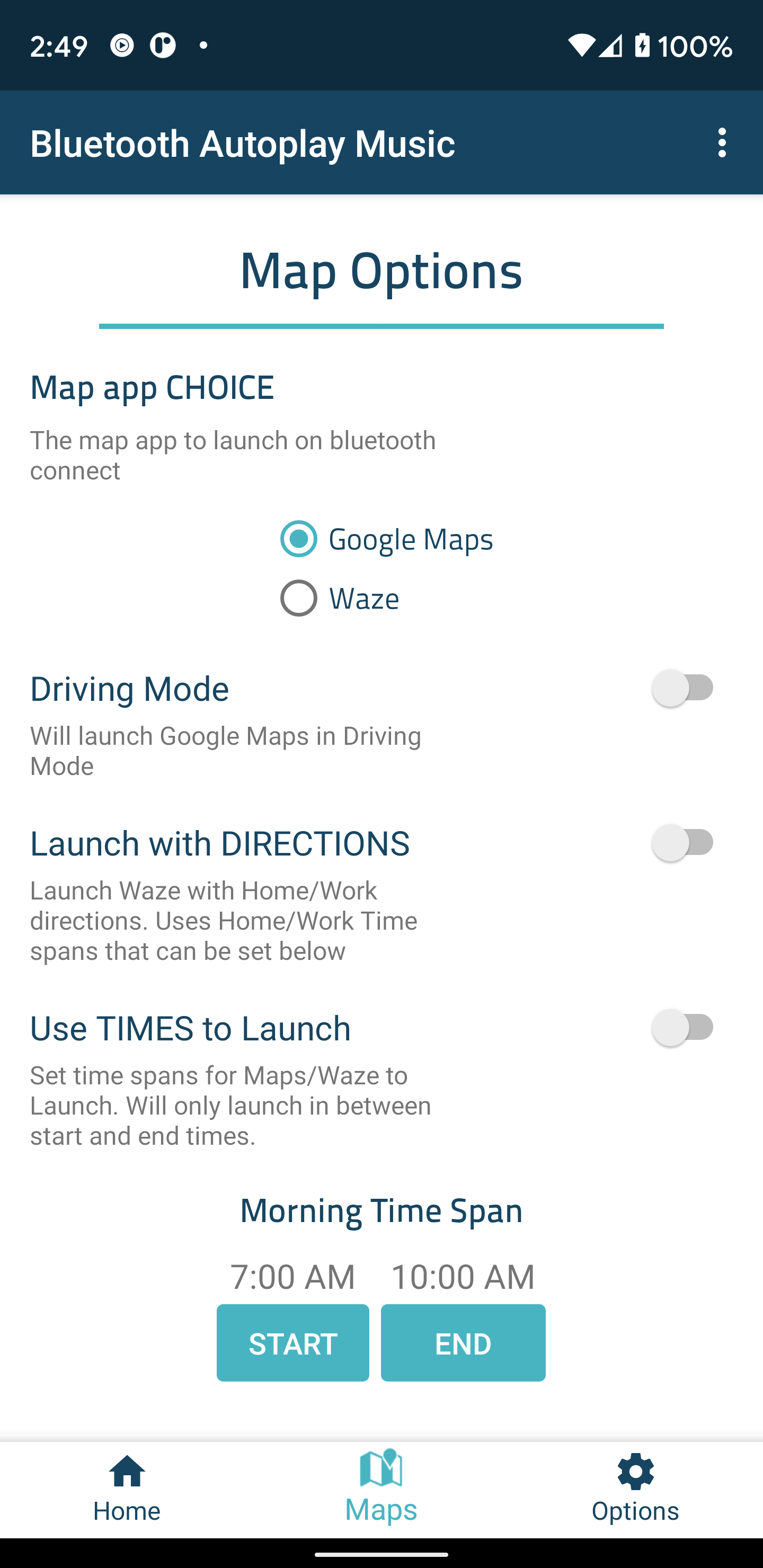
With Maps/Waze you can also have the app launch Work/Home directions within specified times when connected to bluetooth! Great for getting the best route to and from work.
On the connection of a selected bluetooth audio device/s this app can:
- Keep the screen on until device disconnects
- Put phone in Priority Mode until device disconnects
- Set media volume to MAX and put back the original media volume on disconnect
- Launch your music player
- Dismiss the KeyGuard
- Launch Google Maps or Waze
~'Options' to turn on/off:
- Auto-Play music/Podcasts
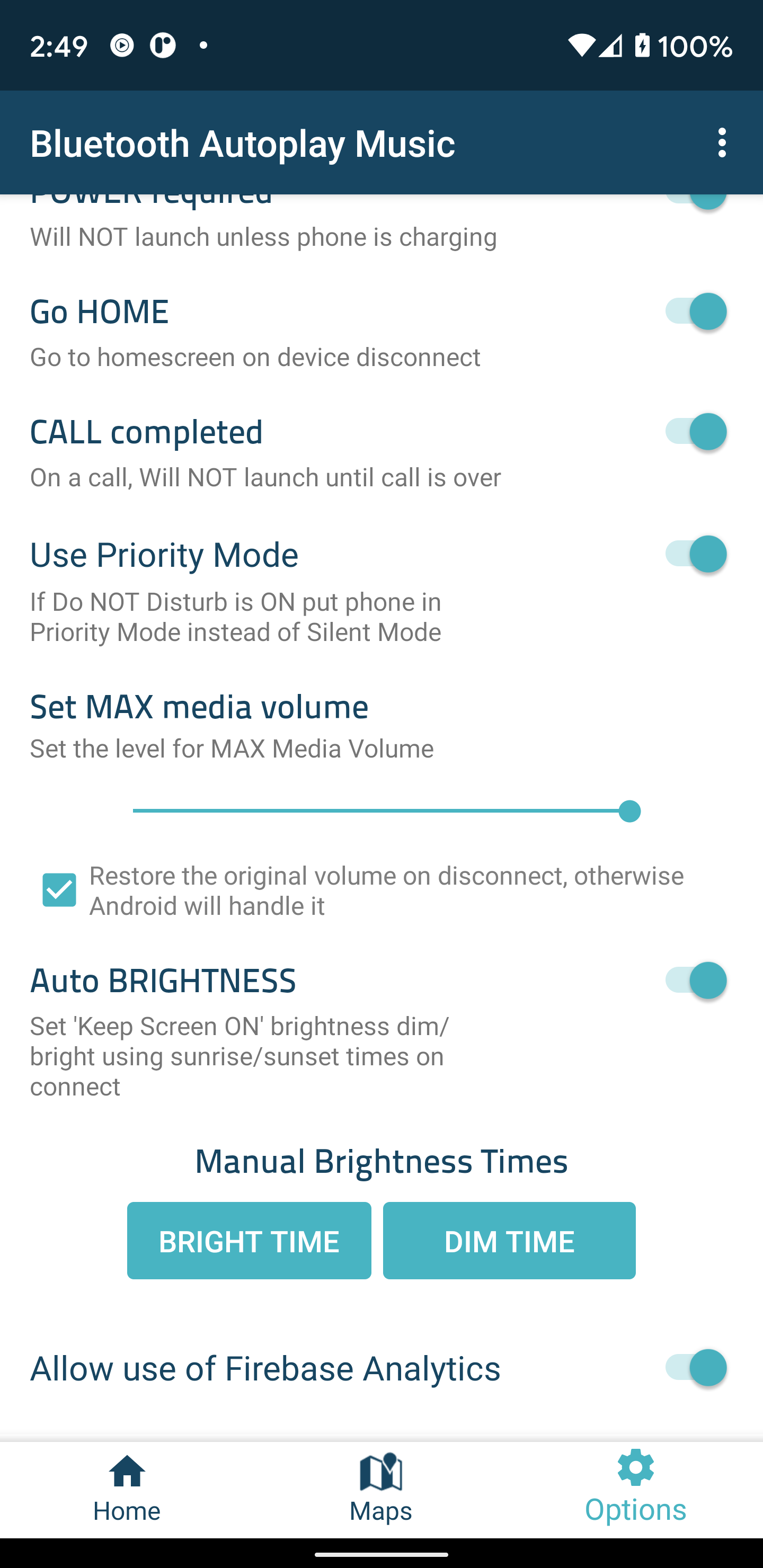
- Will not launch on bluetooth audio connect unless phone is charging(Note: As long as a bluetooth audio connection has been established, the user can connect the phone to power at anytime to launch the app)
- On bluetooth device disconnect go to home screen
- CALL completed' - will not launch during the call.
- Set MAX media Volume - adjust the max media volume level that the app sets when 'Set Media Volume to MAX is ON'
-Use Priority Mode - If Do NOT Disturb is ON put phone in Priority Mode instead of Silent Mode
~Keep Screen ON options:
- Auto Brightness(REQUIRES coarse location) - A single coarse location of the phone will be used to calculate sunrise and sunset times. This is so the screen is brighter during the day and dimmer at night. Only gets a single coarse location when the phone is connecting to a bluetooth device and does not update once connected.
- Manual Brightness Times - Manually set 'Keep Screen ON' Bright/Dim times.
~Maps/Waze options:
- Use times to launch to launch Maps/Waze - Will only launch Maps/Waze in between start and end times.
- Days to launch Maps/Waze - Select the days to launch maps on connect with 'Launch Maps/Waze' is enabled.
- Launch with Directions - Maps/Waze will be launched with directions to WORK/HOME/CUSTOM. ie: Can set WORK to 7am to 9am and HOME to 4pm to 6pm
*CUSTOM location requires a full address with Maps and the name of a Favorite place for Waze
~Waze specific options:
- Close Waze on Disconnect
~Maps specific options:
-Launch Maps in Driving Mode
The Github repo can be found here:
https://github.com/maderski/Bluetooth-AutoPlay-Music
One last thing...I would like to thank everyone who has given me feedback, recommendations, and informed me of issues about the app! :)

Bluetooth Autoplay Music 4.01 Update

- Added support for Android 10 and 11
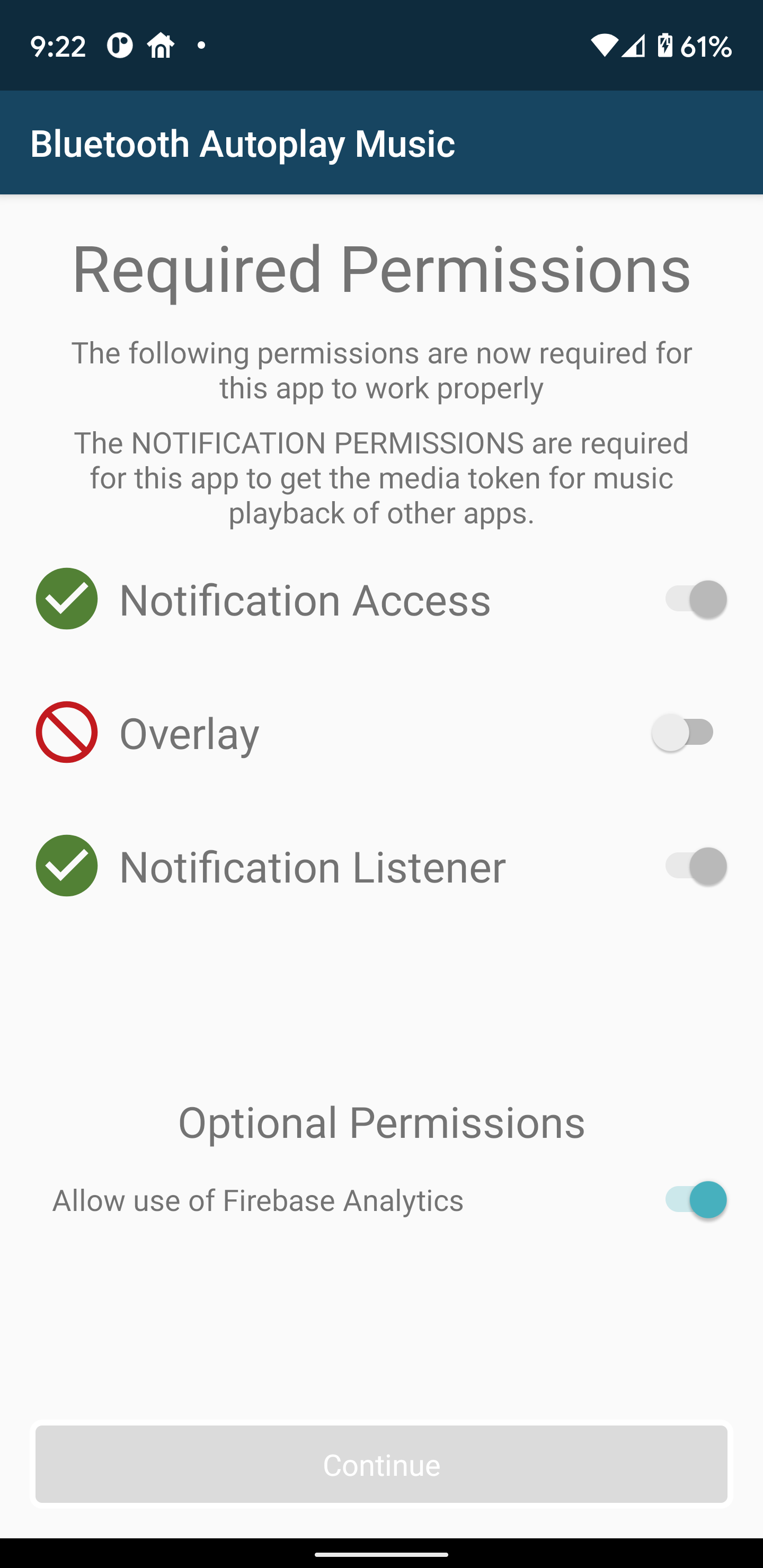
- Now requires Notification access due to needing to get the the Media token for playback
- Removed support for automatically turning wifi on and off
- Improved bluetooth device recognition
- Fixes not able to select all permissions on a small screen
- Bug fixes and improvements
Read More
Bluetooth Autoplay Music Features
Related Videos
Previous Versions More
Bluetooth Autoplay Music
Bluetooth Autoplay Music 4.01 APK
October 26, 2020 4.4 MB

Requires Android: Android 6.0+

Screen DPI: 160-640dpi

SHA1: 2ffd82eb3f7dc2c7d724d1358c23c2d25588ea83

Size: 4.4 MB

What's New:

- Added support for Android 10 and 11
- Now requires Notification access due to needing to get the the Media token for playback
- Removed support for automatically turning wifi on and off
- Improved bluetooth device recognition
- Fixes not able to select all permissions on a small screen
- Bug fixes and improvements
Bluetooth Autoplay Music
Bluetooth Autoplay Music 3.48 APK
November 26, 2018 2.21 MB

Requires Android: Android 5.1+

Screen DPI: 160-640dpi

SHA1: 4bc50c3167ee3aa0c5715b4a924e802990f79b07

Size: 2.21 MB

What's New:

-Fix Pandora not showing up on music player list
Bluetooth Autoplay Music
Bluetooth Autoplay Music 3.46 APK
December 23, 2017 2.38 MB

Requires Android: Android 5.1+

Screen DPI: 160-640dpi

SHA1: 41a90d27e88d3772005dc11996aa40093f970334

Size: 2.38 MB

What's New:

-An additional bug fix
-New Feature - can now have Headphone devices require A2DP(may fix issues with music playing on phone before headphones or speaker connects)
-New Feature - set a custom location! Google Maps requires an address and Waze requires the name of a Favorite
-New Feature - select individual days for Custom, Work and Home Directions
-New Feature - set phone to use Priority Mode instead of Silent Mode if Do Not Disturb is ON
-Now only supports Android 5.1 or higher
Bluetooth Autoplay Music
Bluetooth Autoplay Music 3.44 APK
December 20, 2017 2.38 MB

Requires Android: Android 5.1+

Screen DPI: 160-640dpi

SHA1: dc97cbc846592c2bd0fc95e7ed08a35f7a9bb4a6

Size: 2.38 MB

What's New:

-Bug fixes and improvements
-New Feature - can now have Headphone devices require A2DP(may fix issues with music playing on phone before headphones or speaker connects)
-New Feature - set a custom location! Google Maps requires an address and Waze requires the name of a Favorite
-New Feature - select individual days for Custom, Work and Home Directions
-New Feature - set phone to use Priority Mode instead of Silent Mode if Do Not Disturb is ON
-Now only supports Android 5.1 or higher
More Information

Category:

Tools Apps

Update Date:

Latest Version:

4.01

Need Update:

Submit latest version

Requirements:

Android 6.0+