Bluetooth Autoplay Music

8.1 132

v4.01 by Jason A. Maderski

Bluetooth Autoplay Music APK 下載 Bluetooth Autoplay Music APK 下載

關於 Bluetooth Autoplay Music

Bluetooth Autoplay Music(包名:maderski.bluetoothautoplaymusic)開發者是Jason A. Maderski,Bluetooth Autoplay Music的最新版本4.01更新時間為2020年10月20日。Bluetooth Autoplay Music的分類是工具。您可以查看Bluetooth Autoplay Music的開發者下的所有應用並找到Bluetooth Autoplay Music在安卓上的156個相似應用。目前這個應用免費。該應用可以從APKFab或Google Play下載到Android 6.0+。APKFab.com的所有APK/XAPK文檔都是原始文檔並且100%安全下載的資源。
這個程序是為我自己和我的一些好朋友創建的。我已經使用了一段時間,並且發現它非常有用。因此,我決定將其發佈在Play商店中,以供其他人使用。 :)
此應用程序支持以下音樂播放器:
-YouTube音樂
-Spotify
所有其他音樂播放器可能會或可能無法與該應用程序正常工作。
連接到選定的藍牙設備後,此應用可以打開屏幕並關閉鍵盤鎖。在啟用了Smartlock的藍牙設備連接的Android 9和較舊的android設備上,它甚至可以關閉帶有屏幕鎖定的鍵盤鎖。
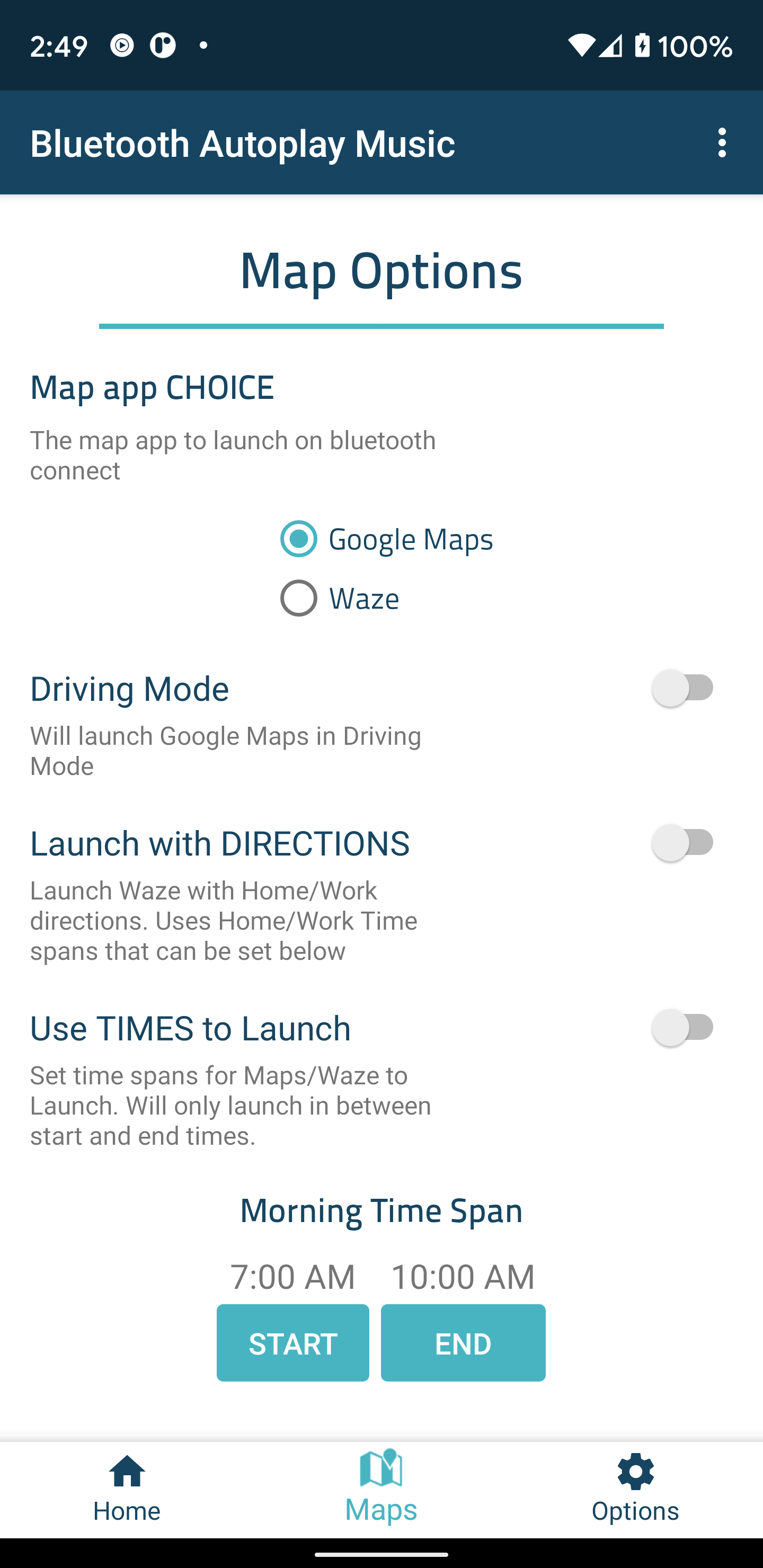
使用Maps / Waze,您還可以在連接藍牙後指定時間內在指定時間內啟動應用啟動工作/家庭路線!非常適合獲得最佳上下班路線。
連接選定的藍牙音頻設備後,此應用可以:
-一直打開屏幕直到設備斷開連接
-將手機置於優先模式,直到設備斷開連接
-將媒體音量設置為MAX,並在斷開連接時放回原始媒體音量
-啟動音樂播放器
-解散KeyGuard
-啟動Google地圖或位智
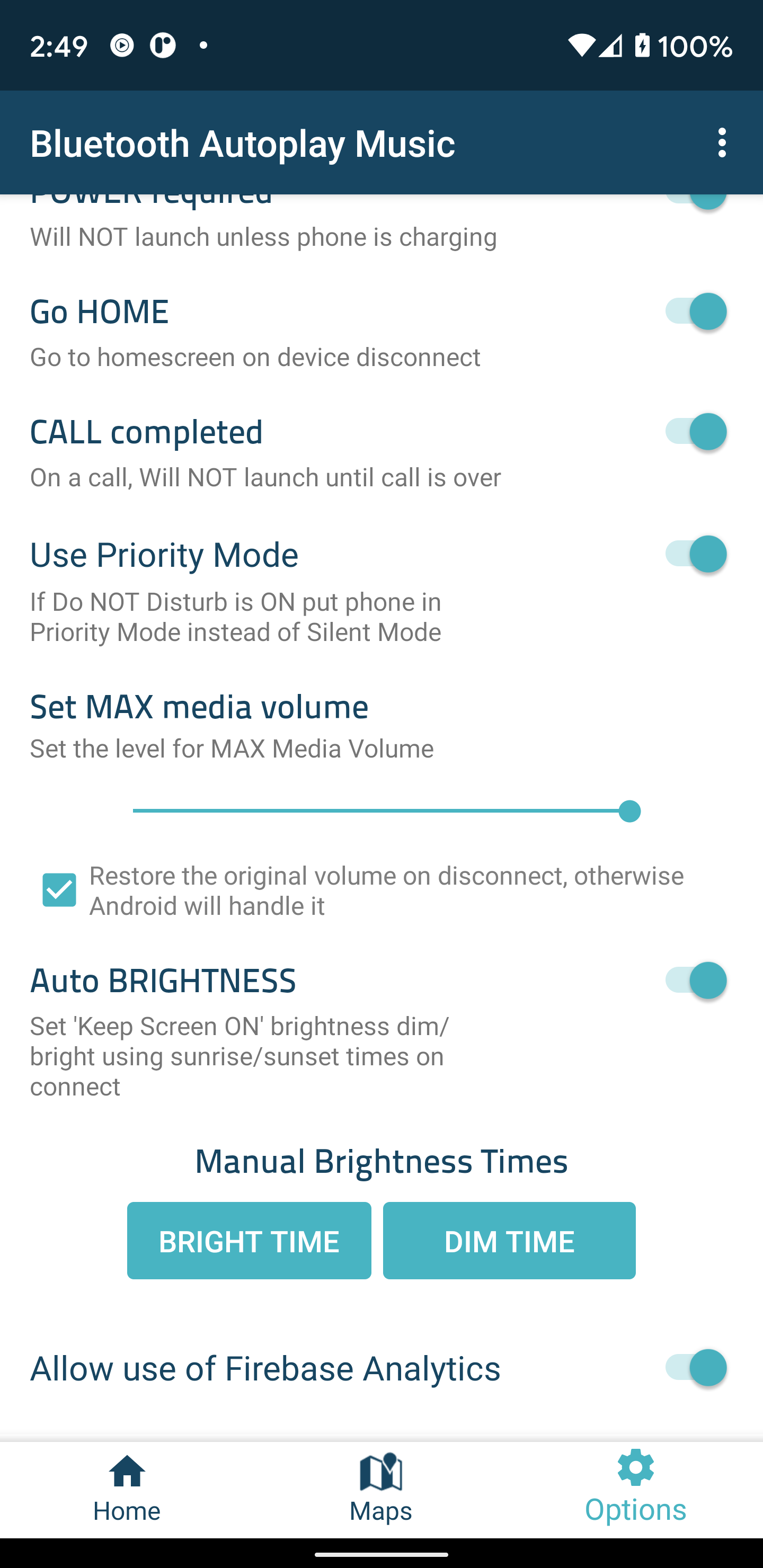
〜'選項'打開/關閉:
-自動播放音樂/播客
-除非手機正在充電,否則不會在藍牙音頻連接上啟動(注意:只要建立了藍牙音頻連接,用戶就可以隨時將手機接通電源以啟動應用程序)
-在藍牙設備上斷開連接進入主屏幕
-通話已完成”-在通話過程中不會啟動。
-設置最大媒體音量-調整“設置最大媒體音量為開”時應用設置的最大媒體音量
-使用優先模式-如果啟用了“請勿打擾”,則將電話置於優先模式而不是靜音模式
〜保持屏幕打開選項:
-自動亮度(需要粗略的位置)-手機的單個粗略位置將用於計算日出和日落時間。這樣一來,白天的屏幕會變亮,晚上的屏幕會變暗。僅在手機連接到藍牙設備時獲得一個粗略位置,並且一旦連接就不會更新。
-手動亮度時間-手動設置“保持屏幕開啟”的亮度/暗淡時間。
〜地圖/ Waze選項:
-使用啟動時間來啟動Maps / Waze-僅在開始時間和結束時間之間啟動Maps / Waze。
-啟動地圖/位圖的天數-選擇啟用與“啟動地圖/位圖”連接時啟動地圖的天數。
-帶有指示的啟動-將以指向WORK / HOME / CUSTOM的指示啟動Maps / Waze。即:可以將工作設置為上午7點至上午9點,將首頁設置為4點至6點。
* CUSTOM的位置需要包含Maps的完整地址和Waze的最愛地點的名稱
〜請注意特定選項:
-斷開時關閉位智
〜地圖特定選項:
-在駕駛模式下啟動地圖
Github倉庫可以在這裡找到:
https://github.com/maderski/Bluetooth-AutoPlay-Music
最後一件事...我要感謝向我提供反饋,建議並向我通報有關該應用程序問題的所有人! :)

Bluetooth Autoplay Music 4.01 更新

- Added support for Android 10 and 11
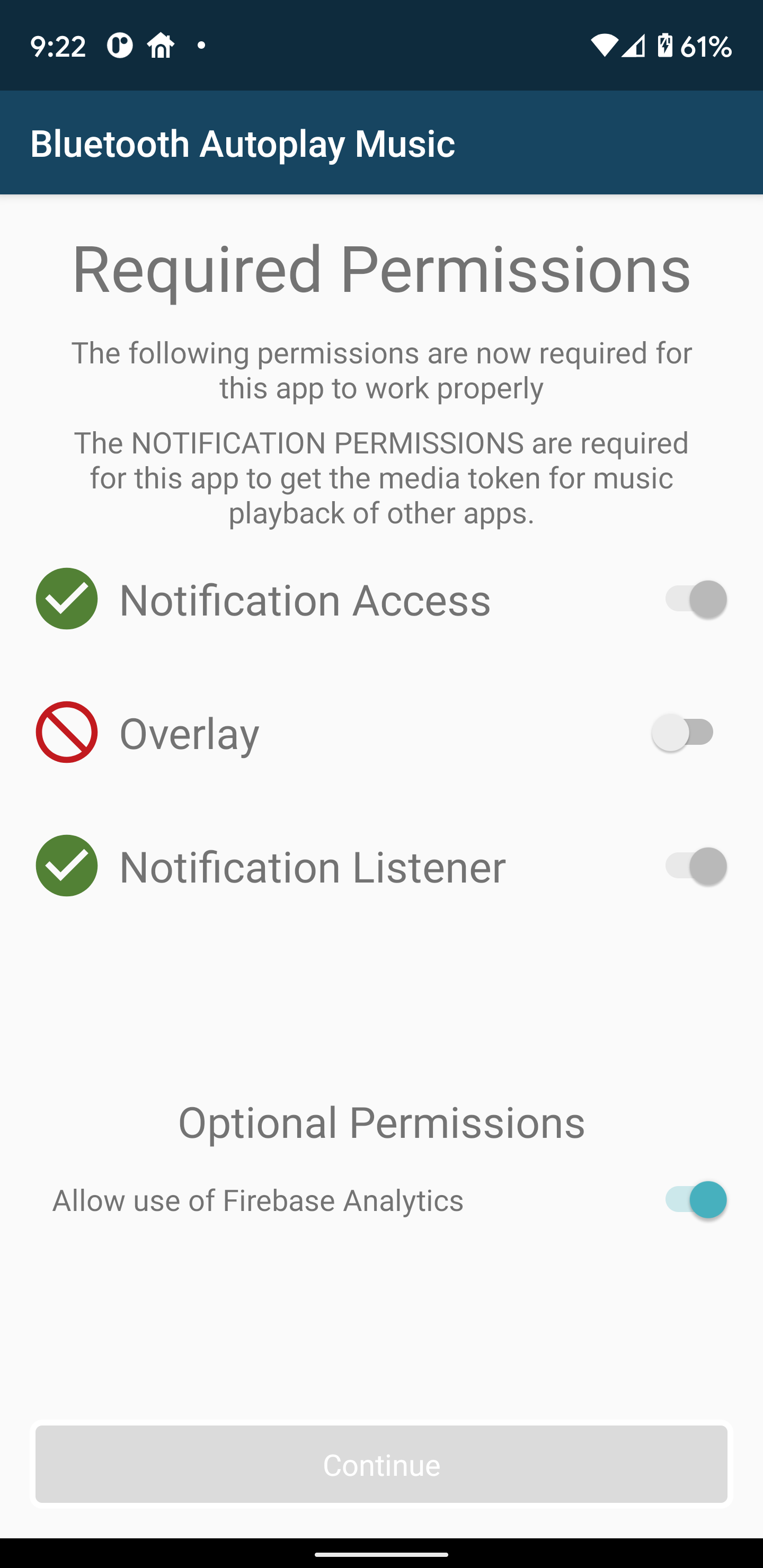
- Now requires Notification access due to needing to get the the Media token for playback
- Removed support for automatically turning wifi on and off
- Improved bluetooth device recognition
- Fixes not able to select all permissions on a small screen
- Bug fixes and improvements
查看更多
Bluetooth Autoplay Music 資訊
相關視頻
歷史版本 更多
Bluetooth Autoplay Music
Bluetooth Autoplay Music 4.01 APK
2020年10月26日 4.4 MB

Requires Android: Android 6.0+

Screen DPI: 160-640dpi

SHA1: 2ffd82eb3f7dc2c7d724d1358c23c2d25588ea83

Size: 4.4 MB

What's New:

- Added support for Android 10 and 11
- Now requires Notification access due to needing to get the the Media token for playback
- Removed support for automatically turning wifi on and off
- Improved bluetooth device recognition
- Fixes not able to select all permissions on a small screen
- Bug fixes and improvements
Bluetooth Autoplay Music
Bluetooth Autoplay Music 3.48 APK
2018年11月26日 2.21 MB

Requires Android: Android 5.1+

Screen DPI: 160-640dpi

SHA1: 4bc50c3167ee3aa0c5715b4a924e802990f79b07

Size: 2.21 MB

What's New:

-Fix Pandora not showing up on music player list
Bluetooth Autoplay Music
Bluetooth Autoplay Music 3.46 APK
2017年12月23日 2.38 MB

Requires Android: Android 5.1+

Screen DPI: 160-640dpi

SHA1: 41a90d27e88d3772005dc11996aa40093f970334

Size: 2.38 MB

What's New:

-An additional bug fix
-New Feature - can now have Headphone devices require A2DP(may fix issues with music playing on phone before headphones or speaker connects)
-New Feature - set a custom location! Google Maps requires an address and Waze requires the name of a Favorite
-New Feature - select individual days for Custom, Work and Home Directions
-New Feature - set phone to use Priority Mode instead of Silent Mode if Do Not Disturb is ON
-Now only supports Android 5.1 or higher
Bluetooth Autoplay Music
Bluetooth Autoplay Music 3.44 APK
2017年12月20日 2.38 MB

Requires Android: Android 5.1+

Screen DPI: 160-640dpi

SHA1: dc97cbc846592c2bd0fc95e7ed08a35f7a9bb4a6

Size: 2.38 MB

What's New:

-Bug fixes and improvements
-New Feature - can now have Headphone devices require A2DP(may fix issues with music playing on phone before headphones or speaker connects)
-New Feature - set a custom location! Google Maps requires an address and Waze requires the name of a Favorite
-New Feature - select individual days for Custom, Work and Home Directions
-New Feature - set phone to use Priority Mode instead of Silent Mode if Do Not Disturb is ON
-Now only supports Android 5.1 or higher
更多資訊

更新日期:

最新版本:

4.01

請求更新:

提交最新版本

系統要求:

Android 6.0+