Bluetooth Autoplay Music

8.1 132

v4.01 by Jason A. Maderski

Bluetooth Autoplay Music アプリダウンロード Bluetooth Autoplay Music アプリダウンロード

Bluetooth Autoplay Musicの詳細

Jason A. Maderskiからリリースされた『Bluetooth Autoplay Music』はツールアプリだ。apkfab.com/jpから『Bluetooth Autoplay Music』のファイルサイズ(APKサイズ):4.4 MB、関連ムービー、pv、スクリーンショット、詳細情報などを確認できる。apkfab.com/jpではJason A. Maderskiより配信したアプリを簡単に検索して見つけることができる。『Bluetooth Autoplay Music』に似ているアプリや類似アプリは156個を見つける。現在、Bluetooth Autoplay Music appのダウンロードも基本プレイも無料だ。『Bluetooth Autoplay Music』のAndroid要件はAndroid 6.0+なので、ご注意ください。APKFabあるいはGooglePlayから『Bluetooth Autoplay Music apk』の最新バージョンを高速、安全にダウンロードできる。APKFab.com/jpでは全てのAPK/XAPKファイルがオリジナルなものなので、高速、安全にダウンロードできる。
このアプリは私自身と私の親友のために作成されました。私はかなり長い間それを使用していて、それがかなり有用であることがわかりました。そこで、他の人が使えるようにPlayストアに投稿することにしました。 :)
このアプリは、次の音楽プレーヤーをサポートしています。
-Youtube Music
-Spotify
他のすべての音楽プレーヤーは、アプリで正しく動作する場合と動作しない場合があります。
このアプリは、選択したBluetoothデバイスに接続した後、画面をオンにしてキーガードを閉じることができます。 Smartlockが有効になっているBluetoothデバイスが接続されているAndroid9以前のAndroidデバイスでは、画面ロックでキーガードを閉じることもできます。
Maps / Wazeを使用すると、Bluetoothに接続しているときに、指定した時間内にアプリで職場/自宅の道順を起動することもできます。仕事への行き来の最適なルートを取得するのに最適です。
選択したBluetoothオーディオデバイスの接続時に、このアプリは次のことができます。
-デバイスが切断されるまで画面をオンのままにします
-デバイスが切断されるまで電話を優先モードにします
-メディアボリュームをMAXに設定し、切断時に元のメディアボリュームに戻します
-音楽プレーヤーを起動します
-KeyGuardを閉じます
-GoogleマップまたはWazeを起動します
〜オン/オフにする「オプション」:
-音楽/ポッドキャストの自動再生
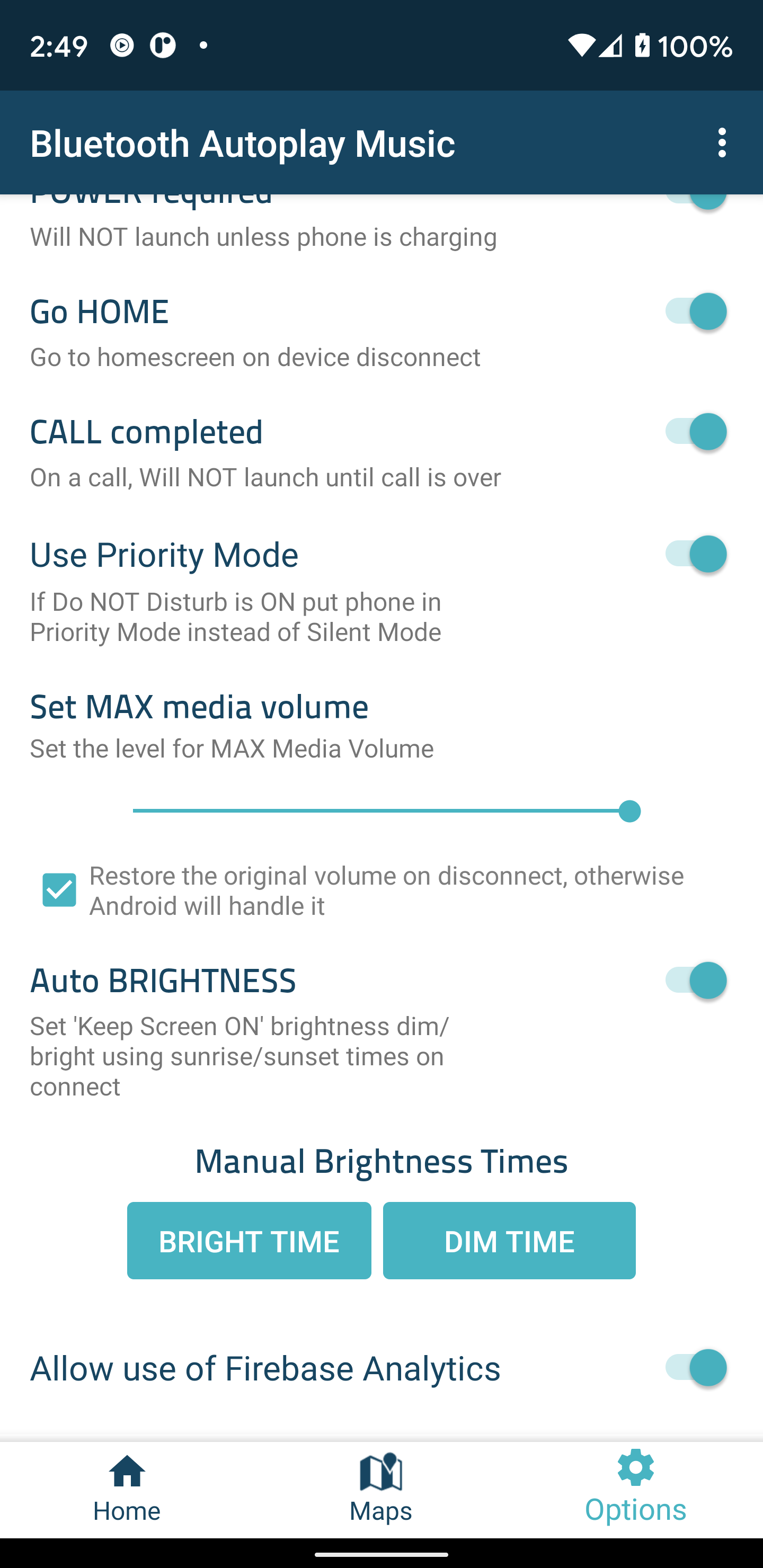
-電話が充電されていない限り、Bluetoothオーディオ接続では起動しません(注:Bluetoothオーディオ接続が確立されている限り、ユーザーはいつでも電話を電源に接続してアプリを起動できます)
-Bluetoothデバイスの切断時にホーム画面に移動します
--CALLcompleted'-通話中は起動しません。
-最大メディア音量の設定-「メディア音量をMAXに設定がオン」のときにアプリが設定する最大メディア音量レベルを調整します
-優先モードを使用する-サイレントモードがオンの場合は、電話をサイレントモードではなく優先モードにします
〜画面をオンに保つオプション:
-自動明るさ(粗い場所が必要)-日の出と日の入りの時刻を計算するために、電話の1つの粗い場所が使用されます。これは、画面が日中は明るく、夜は暗くなるようにするためです。電話機がBluetoothデバイスに接続している場合にのみ、単一の粗い場所を取得し、接続すると更新されません。
-手動明るさ時間-手動で「画面をオンに保つ」明るさ/暗さ時間を設定します。
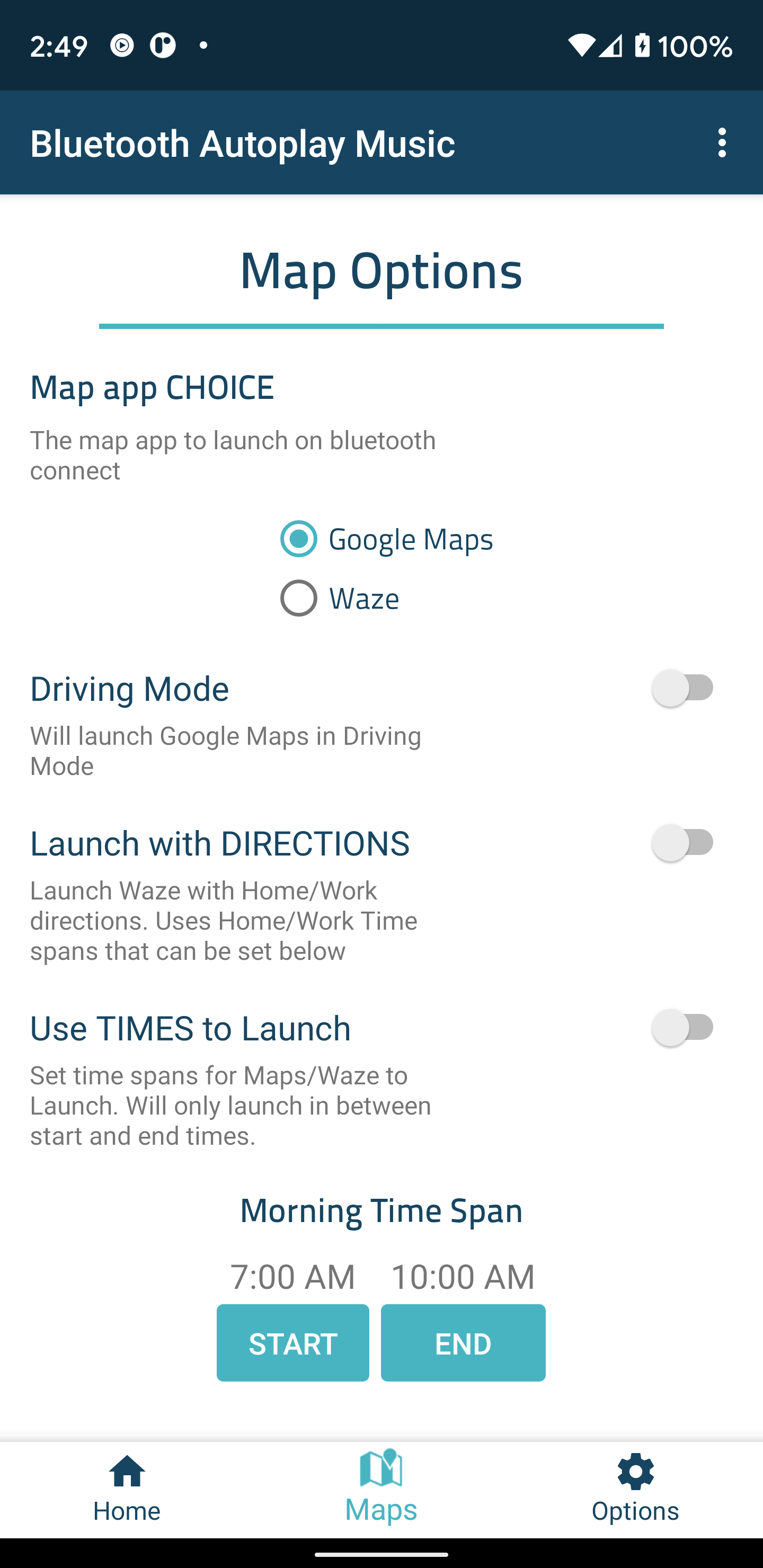
〜マップ/ Wazeオプション:
-起動に時間を使用してMaps / Wazeを起動します-開始時刻と終了時刻の間にのみMaps / Wazeを起動します。
-Maps / Wazeを起動する日-「LaunchMaps / Waze」が有効になっている接続時にマップを起動する日を選択します。
-道順で起動-マップ/ WazeはWORK / HOME / CUSTOMへの道順で起動されます。すなわち:WORKを7amから9amに、HOMEを4pmから6pmに設定できます
*カスタムロケーションには、マップを含む完全なアドレスとWazeのお気に入りの場所の名前が必要です
〜Waze固有のオプション:
-切断時にWazeを閉じる
〜特定のオプションをマップします:
-運転モードでマップを起動する
Githubリポジトリはここにあります:
https://github.com/maderski/Bluetooth-AutoPlay-Music
最後にもう1つ...フィードバックや推奨事項を提供してくれて、アプリに関する問題を知らせてくれたすべての人に感謝します。 :)

Bluetooth Autoplay Music 4.01 アップデート

- Added support for Android 10 and 11
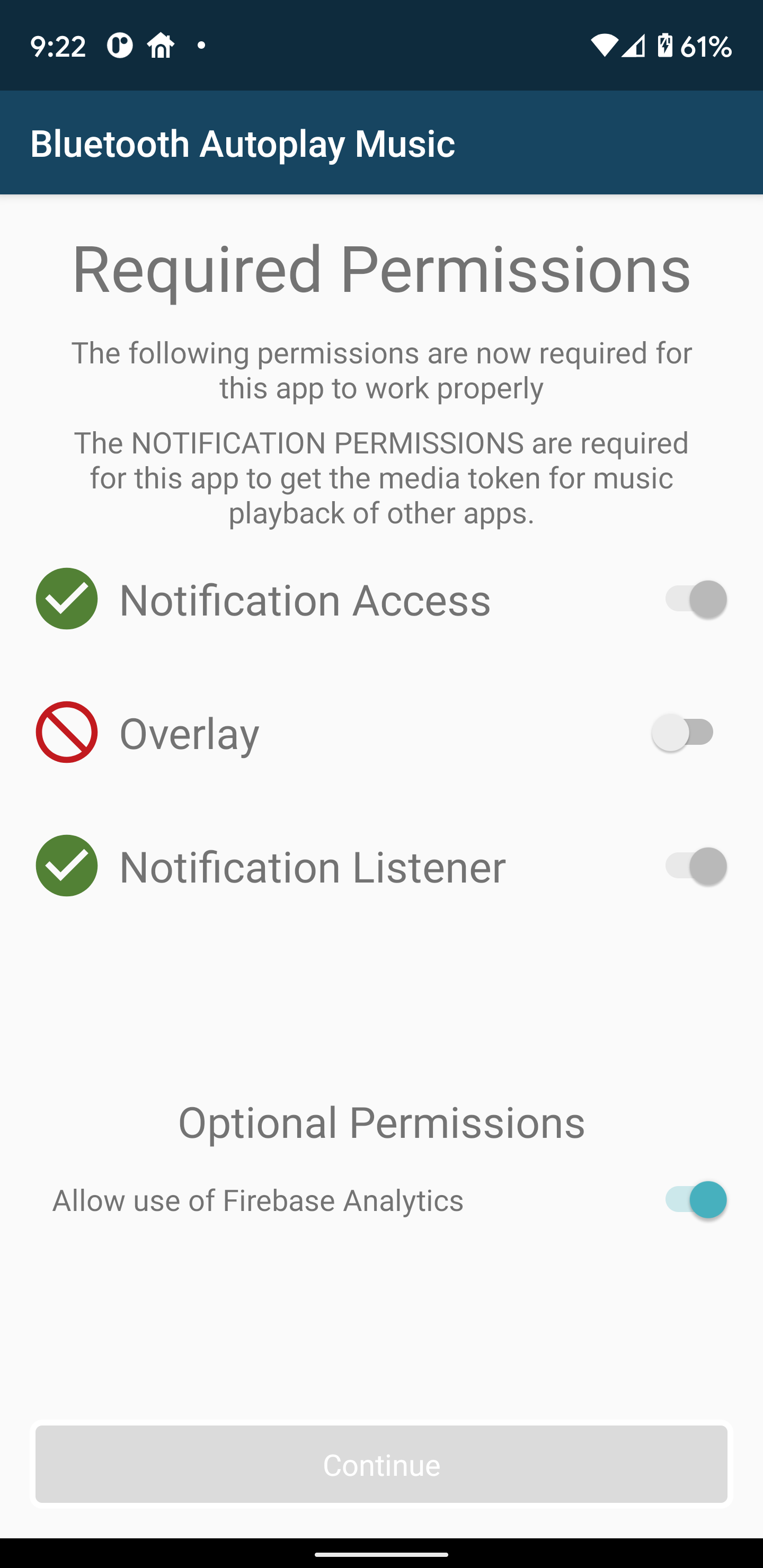
- Now requires Notification access due to needing to get the the Media token for playback
- Removed support for automatically turning wifi on and off
- Improved bluetooth device recognition
- Fixes not able to select all permissions on a small screen
- Bug fixes and improvements
続きを読む
Bluetooth Autoplay Music 特徴
関連動画
バージョン履歴 もっと見る
Bluetooth Autoplay Music
Bluetooth Autoplay Music 4.01 APK
2020年10月26日 4.4 MB

Requires Android: Android 6.0+

Screen DPI: 160-640dpi

SHA1: 2ffd82eb3f7dc2c7d724d1358c23c2d25588ea83

Size: 4.4 MB

What's New:

- Added support for Android 10 and 11
- Now requires Notification access due to needing to get the the Media token for playback
- Removed support for automatically turning wifi on and off
- Improved bluetooth device recognition
- Fixes not able to select all permissions on a small screen
- Bug fixes and improvements
Bluetooth Autoplay Music
Bluetooth Autoplay Music 3.48 APK
2018年11月26日 2.21 MB

Requires Android: Android 5.1+

Screen DPI: 160-640dpi

SHA1: 4bc50c3167ee3aa0c5715b4a924e802990f79b07

Size: 2.21 MB

What's New:

-Fix Pandora not showing up on music player list
Bluetooth Autoplay Music
Bluetooth Autoplay Music 3.46 APK
2017年12月23日 2.38 MB

Requires Android: Android 5.1+

Screen DPI: 160-640dpi

SHA1: 41a90d27e88d3772005dc11996aa40093f970334

Size: 2.38 MB

What's New:

-An additional bug fix
-New Feature - can now have Headphone devices require A2DP(may fix issues with music playing on phone before headphones or speaker connects)
-New Feature - set a custom location! Google Maps requires an address and Waze requires the name of a Favorite
-New Feature - select individual days for Custom, Work and Home Directions
-New Feature - set phone to use Priority Mode instead of Silent Mode if Do Not Disturb is ON
-Now only supports Android 5.1 or higher
Bluetooth Autoplay Music
Bluetooth Autoplay Music 3.44 APK
2017年12月20日 2.38 MB

Requires Android: Android 5.1+

Screen DPI: 160-640dpi

SHA1: dc97cbc846592c2bd0fc95e7ed08a35f7a9bb4a6

Size: 2.38 MB

What's New:

-Bug fixes and improvements
-New Feature - can now have Headphone devices require A2DP(may fix issues with music playing on phone before headphones or speaker connects)
-New Feature - set a custom location! Google Maps requires an address and Waze requires the name of a Favorite
-New Feature - select individual days for Custom, Work and Home Directions
-New Feature - set phone to use Priority Mode instead of Silent Mode if Do Not Disturb is ON
-Now only supports Android 5.1 or higher
追加情報

カテゴリー:

ツール アプリ

更新日:

最新バージョン:

4.01

バージョンアップ申請:

最新版提出

Android要件:

Android 6.0+