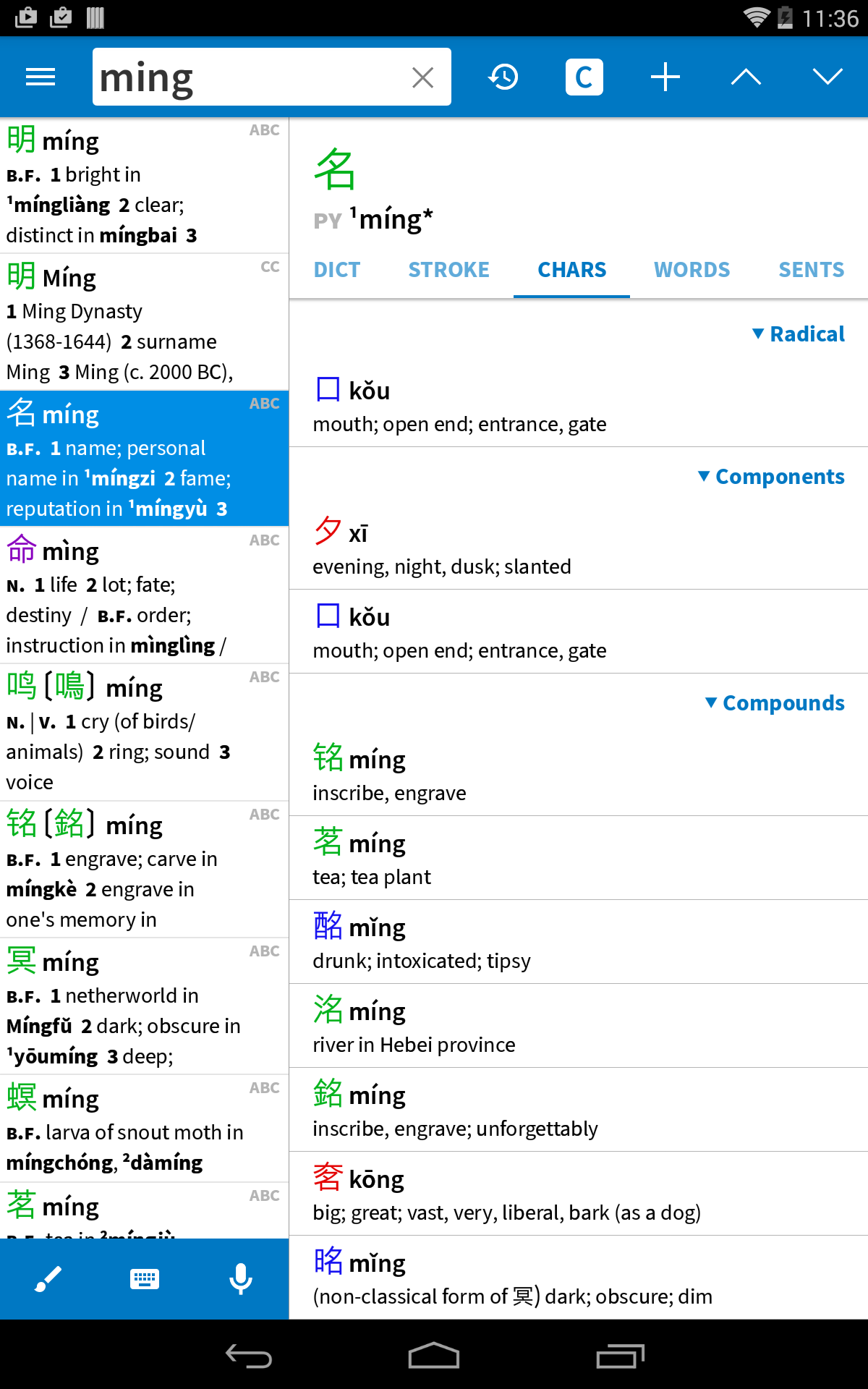
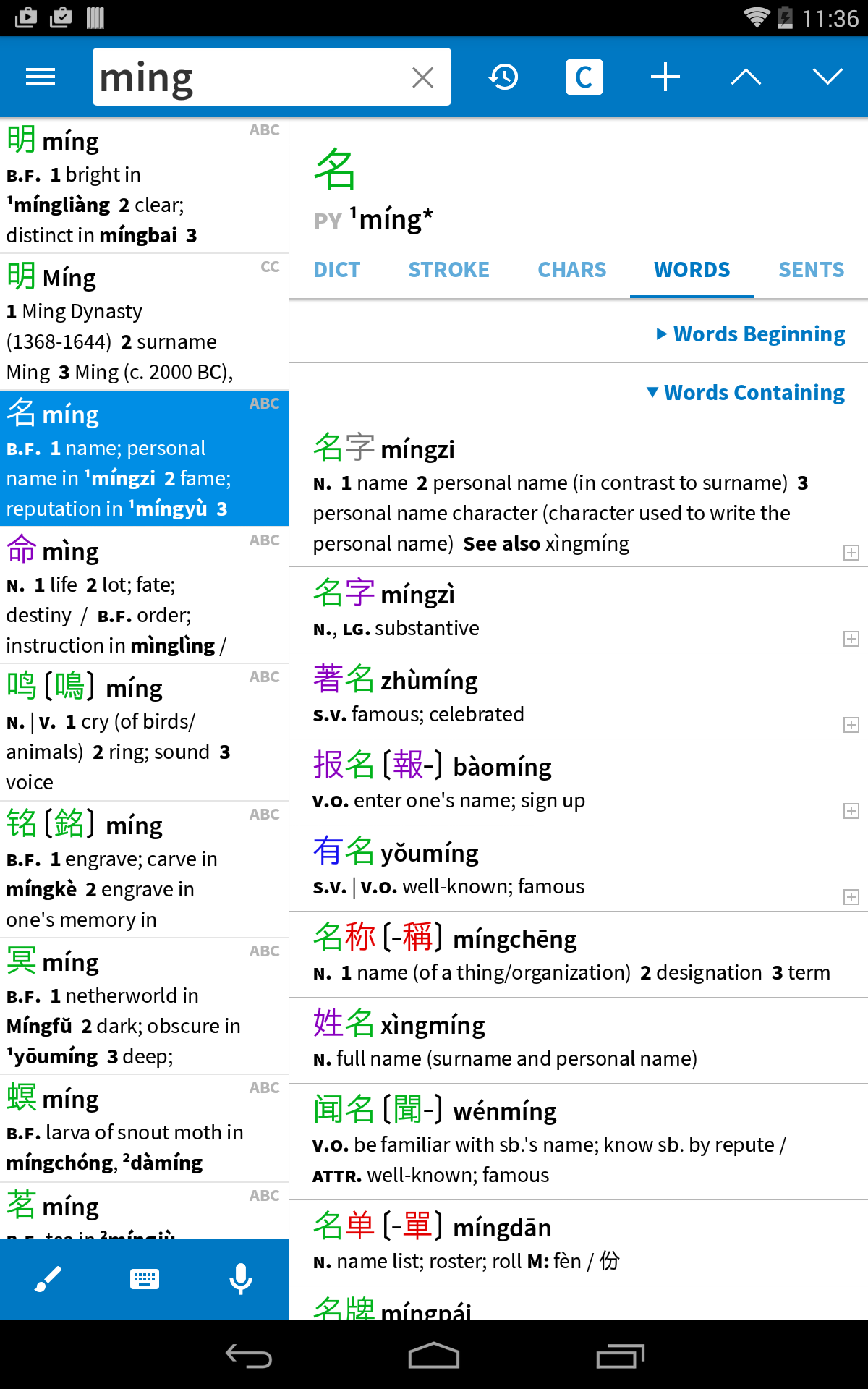
Pleco — лучший помощник в изучении китайского языка. Это интегрированная китайско-английская система чтения/чтения документов/карточек с полноэкранным рукописным вводом и поиском символов с помощью камеры в реальном времени от компании с 17-летним опытом создания мобильного программного обеспечения для изучения китайского языка. Основные функции: ($ = платная надстройка) • Отличные словари: бесплатное приложение поставляется с двумя словарями — CC-CEDICT и нашим внутренним словарем PLC, которые в совокупности охватывают 130 000 китайских слов и включают 20 000 примеров предложений с пиньинь. Мы предлагаем еще 8 бесплатных словарей в качестве необязательных загрузок, в том числе кантонско-английский словарь с 22 000 статей, а 19 других замечательных словарей доступны в виде платных обновлений. ($) • Рукописный ввод: поиск неизвестных символов путем их рисования с помощью лучшего в своем классе механизма распознавания. (базовая версия бесплатная, расширенная версия $) • Оптическое распознавание символов в реальном времени (OCR): ищите китайские слова в словаре, просто наводя на них камеру вашего устройства или прокручивая неподвижное изображение. ($) • Screen Reader/OCR: мгновенный поиск китайских слов в других приложениях через плавающий интерфейс; работает на Android 4.1 и более поздних версиях. (читатель бесплатно, OCR $) • Система карточек: создавайте карточки из любой словарной статьи одним нажатием кнопки, импортируйте готовые списки слов, используйте передовые методы, такие как SRS (интервальное повторение), и учитесь в различных режимах, включая заполнение. -заготовки и тоновые упражнения. (простая версия бесплатная, полнофункциональная $) • Аудиопроизношение: мгновенный прослушивание заглавных слов китайского словаря на языке носителей мужского и женского пола; доступны записи объемом более 34 000 слов. (бесплатный сшитый слог, многосложный $) Или прослушайте примеры предложений с преобразованием текста в речь (бесплатная система TTS, расширенный $). • Мощный поиск: поиск слов по китайским иероглифам, пиньинь (пробелы/тоны необязательны) или их комбинации с поддержкой подстановочных знаков и полнотекстового поиска. • Перекрестные ссылки: нажмите на любой китайский иероглиф/слово в любой словарной статье, чтобы открыть его определение. • Схемы порядка штрихов: анимации, показывающие, как рисовать каждый китайский иероглиф; 500 в бесплатном приложении, 28 000 в платном дополнении. • Распознавание голоса: ищите слова, произнося их в микрофон устройства. • Document Reader: откройте текстовый или PDF-файл на китайском языке и найдите неизвестные слова в словаре, просто нажав на них. ($) Вы также можете искать символы на веб-страницах через «Поделиться» и в других документах через буфер обмена. (свободно) • Подходит для Китая и Тайваня: поддерживает традиционные и упрощенные символы (в словарных определениях, порядке штрихов, поиске, распознавании символов и рукописном вводе), а также поддерживает чжуинь (с поддержкой ruby) и пиньинь для произношения. отображать. • Кантонский диалект: отображать заголовки + выполнять поиск в романизации Jyutping/Yale. Мы также предлагаем кантонский словарь и кантонские звуковые дополнения. (несколько долларов) • Без рекламы: мы даже не будем уговаривать вас покупать дополнения. Мы также предлагаем отличную поддержку клиентов — отправьте нам электронное письмо и убедитесь сами — и активное сообщество пользователей на plecoforums.com. Мы делаем приложения для китайских словарей с 2000 года, и наши продажи и клиентская база неуклонно растут в течение 17 лет на четырех различных платформах. Мы заботимся о наших давних пользователях: люди, которые купили словарь для Palm Pilot в 2001 году, могут использовать этот словарь на новом телефоне Android в 2020 году, даже не платя за обновление. Платные надстройки можно перенести на новое устройство, как и любое другое платное приложение; просто откройте наше бесплатное приложение на своем новом устройстве, и они должны снова активироваться. Если у вас уже есть Pleco на другой ОС, см. pleco.com/android для вариантов миграции. Это приложение использует службы специальных возможностей. (для нашей функции чтения с экрана, которая помогает пользователям жить в китайскоязычных регионах, не зная китайского языка) Twitter/Facebook: Плекософт
Обновление Pleco 3.2.101
• Added updated flashcards for the 2026 HSK 3.0 to Import/Export / Install Premade Cards; these also include about 100 custom definitions to help ensure that the important HSK-relevant senses are surfaced for every word. • Overhauled our 'experimental OCR' algorithm (Settings/OCR), making it much faster, better at detecting single-character rects, supporting it in live as well as still OCR, and adding an option to bring back the old green overlay interface when it's turned on. • Bug fixes.
• Added updated flashcards for the 2026 HSK 3.0 to Import/Export / Install Premade Cards; these also include about 100 custom definitions to help ensure that the important HSK-relevant senses are surfaced for every word. • Overhauled our 'experimental OCR' algorithm (Settings/OCR), making it much faster, better at detecting single-character rects, supporting it in live as well as still OCR, and adding an option to bring back the old green overlay interface when it's turned on. • Bug fixes.
• Added updated flashcards for the 2026 HSK 3.0 to Import/Export / Install Premade Cards; these also include about 100 custom definitions to help ensure that the important HSK-relevant senses are surfaced for every word. • Overhauled our 'experimental OCR' algorithm (Settings/OCR), making it much faster, better at detecting single-character rects, supporting it in live as well as still OCR, and adding an option to bring back the old green overlay interface when it's turned on. • Bug fixes.
This update is mostly about fixes for annoying / hard-to-fix bugs, heavily centered around screen reader / OCR - which should work better in fullscreen mode, for example - but touching on lots of other areas too. If there's any long-running bug in our Android app you're aware of that hasn't been fixed in this update (whether or not you've written about it before) please let us know.
This update is mostly about fixes for annoying / hard-to-fix bugs, heavily centered around screen reader / OCR - which should work better in fullscreen mode, for example - but touching on lots of other areas too. If there's any long-running bug in our Android app you're aware of that hasn't been fixed in this update (whether or not you've written about it before) please let us know.
- Greatly sped up our 'experimental still algorithm' (Settings / OCR) and made it crash less, so we strongly recommend everybody try it out to see if it offers a better combination of speed and accuracy for your needs - Various Google-mandated version compatibility updates
- Greatly sped up our 'experimental still algorithm' (Settings / OCR) and made it crash less, so we strongly recommend everybody try it out to see if it offers a better combination of speed and accuracy for your needs - Various Google-mandated version compatibility updates
- Greatly sped up our 'experimental still algorithm' (Settings / OCR) and made it crash less, so we strongly recommend everybody try it out to see if it offers a better combination of speed and accuracy for your needs - Various Google-mandated version compatibility updates
- Adopted new HWR + OCR libraries by default, including for live OCR, though you can revert to the old ones in settings - Adopted better/streamlined "new OCR" interface by default for live OCR, though with the new algorithm it's a bit different (we show text above the box rather than as an overlay because ML text rects are less accurate) - Added 'snap OCR' for quick captures of text to tap-lookup - Switched to open-source PDF library and cleaned up some PDF reading annoyances - Many bug fixes
- Adopted new HWR + OCR libraries by default, including for live OCR, though you can revert to the old ones in settings - Adopted better/streamlined "new OCR" interface by default for live OCR, though with the new algorithm it's a bit different (we show text above the box rather than as an overlay because ML text rects are less accurate) - Added 'snap OCR' for quick captures of text to tap-lookup - Switched to open-source PDF library and cleaned up some PDF reading annoyances - Many bug fixes
- Adopted new HWR + OCR libraries by default, including for live OCR, though you can revert to the old ones in settings - Adopted better/streamlined "new OCR" interface by default for live OCR, though with the new algorithm it's a bit different (we show text above the box rather than as an overlay because ML text rects are less accurate) - Added 'snap OCR' for quick captures of text to tap-lookup - Switched to open-source PDF library and cleaned up some PDF reading annoyances - Many bug fixes
- Adopted new HWR + OCR libraries by default, including for live OCR, though you can revert to the old ones in settings - Adopted better/streamlined "new OCR" interface by default for live OCR, though with the new algorithm it's a bit different (we show text above the box rather than as an overlay because ML text rects are less accurate) - Added 'snap OCR' for quick captures of text to tap-lookup - Switched to open-source PDF library and cleaned up some PDF reading annoyances - Many bug fixes
- Adopted new HWR + OCR libraries by default, including for live OCR, though you can revert to the old ones in settings - Adopted better/streamlined "new OCR" interface by default for live OCR, though with the new algorithm it's a bit different (we show text above the box rather than as an overlay because ML text rects are less accurate) - Added 'snap OCR' for quick captures of text to tap-lookup - Switched to open-source PDF library and cleaned up some PDF reading annoyances - Many bug fixes
- Adopted new HWR + OCR libraries by default, including for live OCR, though you can revert to the old ones in settings - Adopted better/streamlined "new OCR" interface by default for live OCR, though with the new algorithm it's a bit different (we show text above the box rather than as an overlay because ML text rects are less accurate) - Added 'snap OCR' for quick captures of text to tap-lookup - Switched to open-source PDF library and cleaned up some PDF reading annoyances - Many bug fixes
- Adopted new HWR + OCR libraries by default, including for live OCR, though you can revert to the old ones in settings - Adopted better/streamlined "new OCR" interface by default for live OCR, though with the new algorithm it's a bit different (we show text above the box rather than as an overlay because ML text rects are less accurate) - Added 'snap OCR' for quick captures of text to tap-lookup - Switched to open-source PDF library and cleaned up some PDF reading annoyances - Many bug fixes
- Adopted new HWR + OCR libraries by default, including for live OCR, though you can revert to the old ones in settings - Adopted better/streamlined "new OCR" interface by default for live OCR, though with the new algorithm it's a bit different (we show text above the box rather than as an overlay because ML text rects are less accurate) - Added 'snap OCR' for quick captures of text to tap-lookup - Switched to open-source PDF library and cleaned up some PDF reading annoyances - Many bug fixes
- Adopted new HWR + OCR libraries by default, including for live OCR, though you can revert to the old ones in settings - Adopted better/streamlined "new OCR" interface by default for live OCR, though with the new algorithm it's a bit different (we show text above the box rather than as an overlay because ML text rects are less accurate) - Added 'snap OCR' for quick captures of text to tap-lookup - Switched to open-source PDF library and cleaned up some PDF reading annoyances - Many bug fixes
- Adopted new HWR + OCR libraries by default, including for live OCR, though you can revert to the old ones in settings - Adopted better/streamlined "new OCR" interface by default for live OCR, though with the new algorithm it's a bit different (we show text above the box rather than as an overlay because ML text rects are less accurate) - Added 'snap OCR' for quick captures of text to tap-lookup - Switched to open-source PDF library and cleaned up some PDF reading annoyances - Many bug fixes
APKFab.com и ссылка для скачивания этого приложения на 100% безопасны. Все ссылки для загрузки приложений, перечисленных на APKFab.com, получены из Google Play Store или предоставлены пользователями. Для приложения из Google Play Store APKFab.com не будет вносить в него никаких изменений. Для приложения, предоставленного пользователями, APKFab.com проверит безопасность его подписи APK перед его выпуском на нашем сайте.