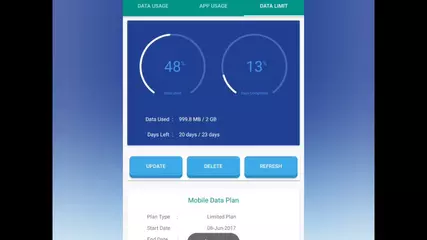
Data Manager and App Usage (Package Name: com.techdev.internetspeedmeter) is developed by TecDroid Developer and the latest version of Data Manager & App Usage 4.6.1 was updated on November 11, 2026. Data Manager & App Usage is in the category of Tools. You can check all apps from the developer of Data Manager & App Usage and find 74 alternative apps to Data Manager & App Usage on Android. Currently this app is for free. This app can be downloaded on Android 10.0+ on APKFab or Google Play. All APK/XAPK files on APKFab.com are original and 100% safe with fast download.
Data Manager is a data usage monitor, net speed meter and app usage tracker in one. See exactly which apps use your mobile data and Wi-Fi, keep a daily data plan on track, watch live internet speed in your status bar and see how much time you spend on your phone. Everything is read from Android's own usage statistics and processed on your phone. No account, no sign-up.
Data usage monitor per app• Mobile and Wi-Fi data for every app: download, upload, and data used while the app is closed
• Today, yesterday, this week, this month, your billing cycle or any custom dates
• Hour-by-hour, daily and weekly charts
• Device totals from the same Android statistics that Android Settings uses (1 GB = 1000 MB by default, 1024-based units optional)
• Apps using data in the background, with a shortcut to restrict them
• Hotspot and roaming usage, with a once-a-day roaming alert
Net speed meter in the status bar• Live download and upload speed in the status bar while you are online
• Today's mobile and Wi-Fi data usage in the notification
• Quick Settings tile and a launcher shortcut to turn it on or off
Daily data plan and alerts• Monthly, weekly and daily packs (for example 1.5 GB per day) or 28, 56 and 84-day validity packs
• "Safe today": how much data you can use today and still last until the plan renews
• Alerts at 50, 80 and 100 percent of your plan
• Alerts when an app uses far more data than usual or goes online for the first time
• Data limit and screen time limit per app, with a notification as you get close
• Add your plan price to see what your data costs
Screen time and app usage• Screen time per app, unlocks, notifications and app launches
• Breakdown, App launches, Notifications and Unlocks pages with session lengths and busiest hours
• Your daily rhythm: screen time, unlocks, notifications and launches hour by hour
• Weekly heat map and calendar of when you use your phone
• Most interrupting apps and categories
• Usage history: a timeline of every session, filtered to the apps you choose
App detailsTap any app to see its usage chart, screen time, sessions, Wi-Fi and mobile data, download and upload, foreground and background data, permissions and app information, with shortcuts to its system settings.
Insights and reports• Smart insights: unusual spikes, trends against last week, background data and plan pace
• Summary of data, time and apps by day, week or month
• "My week" card to share as an image, and an optional weekly report
• Daily summary notification
• Export reports as PDF or CSV
• Optional streaks, badges, goals and break reminders (off by default)
Widgets and more• Home-screen widgets for data usage, screen time or both, in small, medium and large sizes
• App lock with your fingerprint, face or screen lock
• Back up history, plans and settings to a file (for example on Google Drive) and restore it on a new phone
• Light and dark themes, 10 accent colours or your wallpaper colours
• 19 languages, including Hindi, Marathi, Bengali, Urdu, Persian and Indonesian
• Works on phones, tablets and foldables
Private by design• Your data usage and app usage are processed on your phone and are not uploaded
• No account or sign-in
• Usage Access is used only to read data usage and screen time statistics
Permissions• Usage Access: to read per-app data usage and screen time
• Notifications: for the speed meter, data plan alerts and summaries
• Phone (Android 7 to 9 only): to read mobile data totals for your SIM
The app is free with ads. A one-time in-app purchase removes ads.
Questions or ideas? Write to
[email protected]