99 Toolkit (Package Name: com.isnowstudio.mobilenurse1) is developed by Isnow Studio and the latest version of 99 Toolkit 1.1.11 was updated on April 21, 2015. 99 Toolkit is in the category of Productivity. You can check all apps from the developer of 99 Toolkit. Currently this app is for free. This app can be downloaded on Android 4.0.3+ on APKFab or Google Play. All APK/XAPK files on APKFab.com are original and 100% safe with fast download.
99 Toolkit is a essential toolkit of the android phone.
It's a mini and wonderful android toolkit includes a lot of common tool, and more later.
Features:
√ 0. Desktop Widgets
# Real-time battery desktop widget
# Quick switch desktop widget
# Quick toolbox desktop widget
# Task killer widget
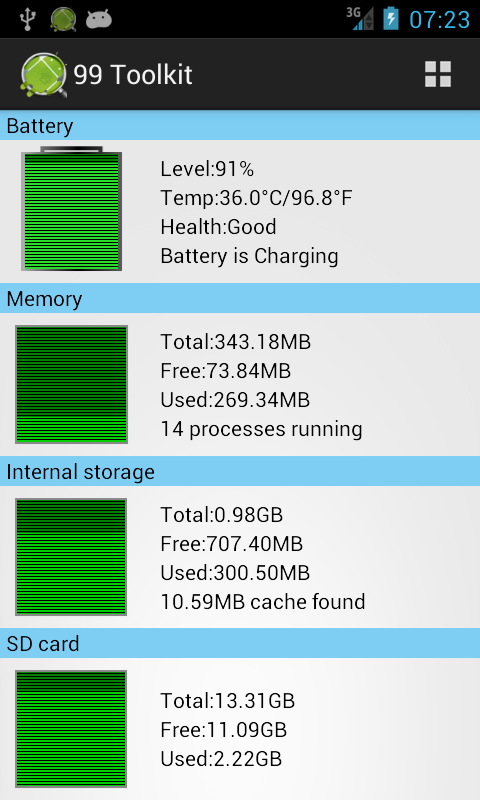
√ 1. System Status
# Graphical display of battery status
# Graphical display of memory state
# Graphical display of internal storage state
# Graphical display of SD card state
√ 2. Power saving settings
# Real-time display of battery status
# Custom power-saving mode, one tap to switch mode
# One tap to switch a set of setting
√ 3. Cache cleaner
# One Tap to clear all caches, release the internal phone storage
# Cache size alerts
√ 4. History clean up
# One Tap to clear historical data on the phone
# Supplementary clean way also provide
√ 5. Recent task
# Show all the recent tasks
# One Tap to terminate task
√ 6. Process Management
# Show all running process
# One Tap to kill process
# Auto kill process
√ 7. Service Management
# Shows all running service
# One Tap to terminate services
√ 8. File Manager
# Explore SD card
# Recognize the all kinds of files
√ 9. Uninstaller
# Display all user-installed applications
# One tap to backup all applications
# Support batch uninstall
# Support batch backup
√ 10.APP2SD
# Display applications on phone storage
# Display applications on SD card
# Display applications which installed only phone storage
# Support move to the phone
# Support moveto SD card
# Support batch operation
√ 11. Installer
# Display the application stored on the SD card
# Support batch installation
√ 12. Battery Information
# Battery real-time information
# Support launcher widget
√ 13. Volume Setting
# Adjust the ring volume
# Adjust the notification volume
# Adjust the media volume
# Adjust the alarm volume
# Adjust the system volume
√ 14. System Information
# Display the phone's hardware information
# Display the phone's software information
# Display the phone's network information
If you have any questions, you can contact us:
[email protected]