SMS Backup & Export to PDF

7.8 356

v3.23 by Codeverse Apps

SMS Backup & Export to PDF APK download SMS Backup & Export to PDF APK download

About SMS Backup

SMS Backup (Package Name: com.jerryzigo.smsbackup) is developed by Codeverse Apps and the latest version of SMS Backup & Export to PDF 3.23 was updated on September 23, 2026. SMS Backup & Export to PDF is in the category of Tools. You can check all apps from the developer of SMS Backup & Export to PDF and find 61 alternative apps to SMS Backup & Export to PDF on Android. Currently this app is for free. This app can be downloaded on Android 6.0+ on APKFab or Google Play. All APK/XAPK files on APKFab.com are original and 100% safe with fast download.
Export SMS and MMS conversations to PDF and print your text messages with names, timestamps and photos. Save one conversation or your entire message history, then share the document or open it on a computer.
Create a readable copy for your records or a formal document to share with a lawyer. Premium is a one-time purchase — no subscription.
📄 EXPORT TO PDF & PRINT
Turn a conversation into a clean, printable document — sender bubbles, date separators, real emoji and your MMS photos, laid out the way you remember them. Print the PDF straight from the app, or open the file on any computer or phone. No extra software needed.
⚖️ COURT-READY LEGAL EXPORT
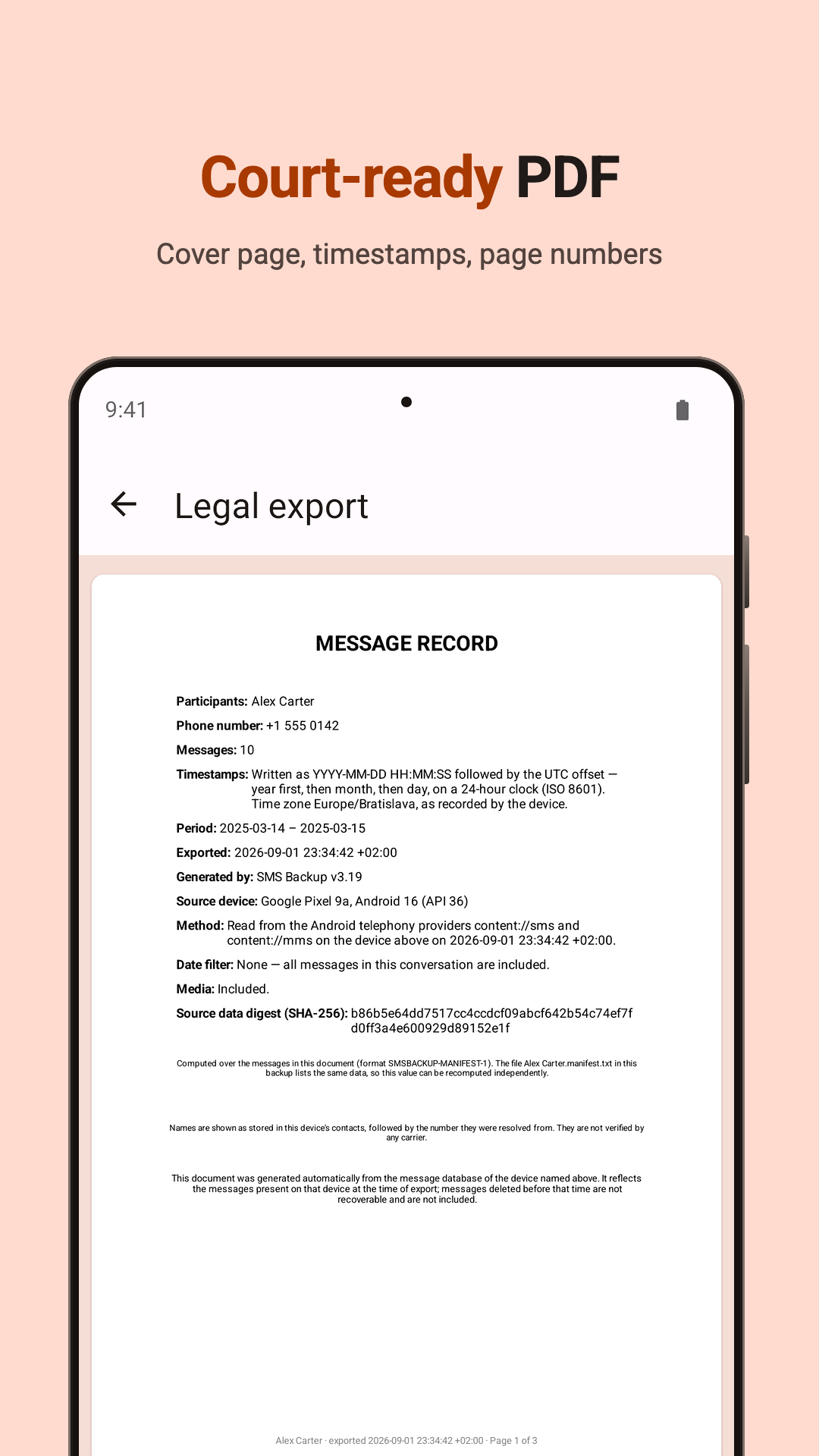
For a custody case, an insurance claim, a harassment report or a dispute with a landlord: a formal PDF with a cover page, the total message count, a sender caption above every single message, full timestamps and "Page X of Y" numbering — built to be handed to a lawyer or filed as an exhibit.
🎯 EXPORT EXACTLY WHAT YOU NEED
• Pick specific conversations, or export everything at once
• Narrow the export to a date range
• Include photos, videos and voice messages as real files alongside the document
• Search all your conversations to find the thread you need
📂 EVERY FORMAT
• PDF — print-ready, opens anywhere
• Dark PDF — the same document on a dark page
• Legal export — cover page, sender captions, page numbers
• HTML — chat bubbles, opens in any browser
• Plain text — the smallest possible file
• CSV — one row per message, opens in Excel or Google Sheets
🔄 BACKUP, TRANSFER & RESTORE
Every backup also contains a restorable data file. Switching phones? Move it to your new device and restore your SMS in a few taps — your messages are never locked into one phone.
⏰ SCHEDULED BACKUPS TO GOOGLE DRIVE
Set it once and forget it — daily, weekly or monthly backups run in the background and upload to your own Google Drive. If your phone is lost or broken, your messages aren't.
🔒 PRIVATE BY DESIGN
• No account or registration needed
• Files are created on your device and stay in your storage or your own Google Drive
• Your messages are never sent to us
⭐ PREMIUM
One single purchase — no subscription.
GOOD TO KNOW
• The app cannot recover messages that were already deleted.
• RCS ("chat") messages can be exported on supported devices (e.g. many Samsung phones). On other devices RCS chats may not appear — SMS and MMS always do.
• Restore currently supports SMS text messages.
Questions or ideas? Get in touch: [email protected]

SMS Backup 3.23 Update

Faster conversation list.
Opening the app on a phone with a lot of messages is noticeably quicker, and the loading screen now tells you what it is working on instead of showing a bare spinner.
Also in this release:
• Search works while the list is still loading. What you type is no longer lost.
• The loading indicator no longer jumps or gets cut off.
Read More
SMS Backup Features
Previous Versions More
SMS Backup & Export to PDF
SMS Backup & Export to PDF 3.23 APK
September 23, 2026 5.78 MB

Requires Android: Android 6.0+

Screen DPI: 160-640dpi

SHA1: 37c5809b42c35fc62f0e6d82612b62b1668ce5d5

Size: 5.78 MB

What's New:

Faster conversation list.
Opening the app on a phone with a lot of messages is noticeably quicker, and the loading screen now tells you what it is working on instead of showing a bare spinner.
Also in this release:
• Search works while the list is still loading. What you type is no longer lost.
• The loading indicator no longer jumps or gets cut off.
SMS Backup & Export to PDF
SMS Backup & Export to PDF 3.22 APK
September 16, 2026 5.78 MB

Requires Android: Android 6.0+

Screen DPI: 160-640dpi

SHA1: cdd5bbec0f01bb8c6e2bae9ba22f6e507db34425

Size: 5.78 MB

What's New:

This release is all about the PDF export.
Message bubbles are now sized to the text inside them, so short messages no longer stretch into half-empty boxes and anything that fits on one line stays on one line. Bubbles are slightly wider too, with even padding on every side, so there are fewer awkward line breaks. Documents come out noticeably shorter and easier to read.
Messages in right-to-left languages now draw inside their bubble instead of beside it.
SMS Backup & Export to PDF
SMS Backup & Export to PDF 3.21 APK
September 8, 2026 5.75 MB

Requires Android: Android 6.0+

Screen DPI: 160-640dpi

SHA1: 4fb7ae57d8d046d71f0fc4f5ac92407a5264fca0

Size: 5.75 MB

What's New:

New: the Stats tab. See how many messages you have sent and received, your busiest months, who you text most, and records like your longest day of messaging — all worked out on your phone.
The app now opens straight to your conversations.
Also in this release:
• Fixed a freeze when opening a backup's details
• Fixed a crash when searching conversations
• Added an FAQ, and a new support address
SMS Backup & Export to PDF
SMS Backup & Export to PDF 3.20 APK
September 4, 2026 5.72 MB

Requires Android: Android 6.0+

Screen DPI: 160-640dpi

SHA1: f9bdcd70f25fdfde7821177460b4c1d87729703c

Size: 5.72 MB

What's New:

The app now opens straight on your conversations. Pick a few to export, or back up everything from the card at the top.
Faster, too: the conversation list loads several times quicker, and large chats open much faster before an export.
Exports now say what they're doing instead of sitting at 0%, and Cancel takes effect immediately.
New Dark PDF export (Premium).
Restoring hands your SMS app back properly and tells you what was restored.
More Information

Package Name:

com.jerryzigo.smsbackup

Category:

Tools Apps

Update Date:

Latest Version:

3.23

Need Update:

Submit latest version

Available on:

Google Play

Requirements:

Android 6.0+