About Podcasts Tracker
Podcasts Tracker (Package Name: com.jonathanantoine.Podcasts) is developed by Jonathan ANTOINE and the latest version of Podcast Player & Tracker 15.0 was updated on October 21, 2026. Podcast Player & Tracker is in the category of Music & Audio. You can check all apps from the developer of Podcast Player & Tracker and find 170 alternative apps to Podcast Player & Tracker on Android. Currently this app is for free. This app can be downloaded on Android 7.0+ on APKFab or Google Play. All APK/XAPK files on APKFab.com are original and 100% safe with fast download.
Take Control of Your Podcasts with Podcast Tracker
Podcast Tracker is the ultimate power-user tool for discovering, organizing, and listening to your favorite shows with surgical precision.
🔍 DISCOVER YOUR NEXT FAVORITE SHOW
- Universal Search: Explore a huge podcast catalog, search episodes on any subject, or add any RSS feed URL directly.
- Charts & Genres: The most popular podcasts by country and language, and 19 categories like Tech, News, Business, and Comedy.
- Quick Preview: Long press a podcast in the charts to see its description, latest episodes, and release rhythm before you subscribe.
- Private Feeds: Full support for password-protected RSS feeds with secure, automatic encoding.
📚 YOUR LIBRARY, YOUR WAY
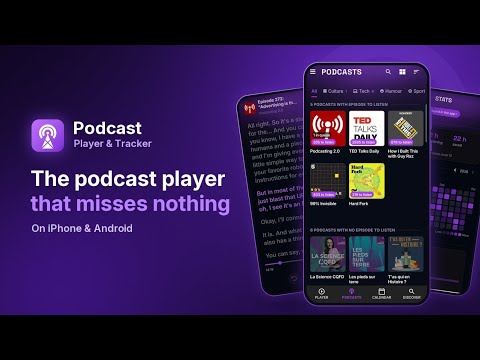
- Cover Grid: Show your podcasts as a list or as a grid of covers, and pinch to resize them.
- Search Your Library: Find any podcast or episode among everything you follow.
- Favorites: Star the episodes you want to keep and find them all on one page.
- Episode Filters: All, Unlistened, Favorites, or Downloaded, remembered for each podcast.
- Seasons & Episode Numbers: Episodes show their number ("S3 E12") and are grouped by season.
- Your Colour: Pick one of 16 colours or create your own (free preview, one-time purchase to apply it).
🎵 ELITE AUDIO ENGINE
- Extreme Speed Control: Adjust playback from 0.2x up to 5.0x with ultra-fine 0.05x increments.
- Volume Booster: Adjust the volume from -200% up to +300%, right from the top of the player, to hear every word in any environment.
- Custom Playback: Choose between Android MediaPlayer or the robust ExoPlayer for a stable listening experience.
- Smart Sleep Timer: Automatically stop playback at a specific time, after the episode, or when your queue ends.
📥 SEAMLESS AUTOMATION
- Auto-Downloads: Set the app to automatically fetch new episodes so they are ready when you are.
- Persistent Queue: Reorder your queue with drag and drop, or drop an episode on the one playing to switch to it. Your queue is saved even if you restart your device.
- Bulk Actions: Long press an episode to select several, then download, delete, or mark them as played in one go.
- Offline & Storage: Listen without mobile data, and choose where episodes are downloaded: internal storage, SD card, or a shared folder.
🚗 CONNECTED & ACCESSIBLE
- Android Auto: A safe, simplified interface for your car's dashboard. Car and headphone buttons can also skip within the episode.
- Google Cast / Chromecast: Stream your podcasts directly to your TV or smart speakers.
- Total Accessibility: Full support for screen readers (TalkBack), large touch targets, and text that follows your system font size.
⚙️ BUILT FOR POWER USERS
- Per-Podcast Settings: Customize every show with unique rules for notifications, auto-downloads, or skipping intros.
- In-Depth Stats: Track your listening habits with monthly and yearly breakdowns.
- OPML Import/Export: Moving from another app? Bring all your subscriptions with you in seconds.
- Dark & Light Themes: A modern, responsive design that follows your system preferences.
✅ Download Podcast Tracker today and take control of your podcasts.
Developer Note: Podcast Tracker is built by an independent developer, often from users' ideas. Every feature is free; optional paid extras support the app.
Podcasts Tracker 15.0 Update
• Give the app your colour: 16 colours or your own, in Settings > Interface customization. Free preview, one-time purchase to apply.
• Your library as a grid of covers. Pinch to resize them.
• Episode numbers above the title, episodes split by season.
• New app icon.
• The cover flies to the podcast page, group titles stay pinned while you scroll.
• Option: next and previous buttons can skip within the episode.
Thanks to Celeste and Thomas for the ideas!
Read More