Navigation (Package Name: map3d.navigasyonfree.navigation.navigation) is developed by ed.mobile and the latest version of Navigation AI: Car Launcher 1.0.3 was updated on September 2, 2026. Navigation AI: Car Launcher is in the category of Travel & Local. You can check all apps from the developer of Navigation AI: Car Launcher and find 132 alternative apps to Navigation AI: Car Launcher on Android. Currently this app is for free. This app can be downloaded on Android 8.0+ on APKFab or Google Play. All APK/XAPK files on APKFab.com are original and 100% safe with fast download.
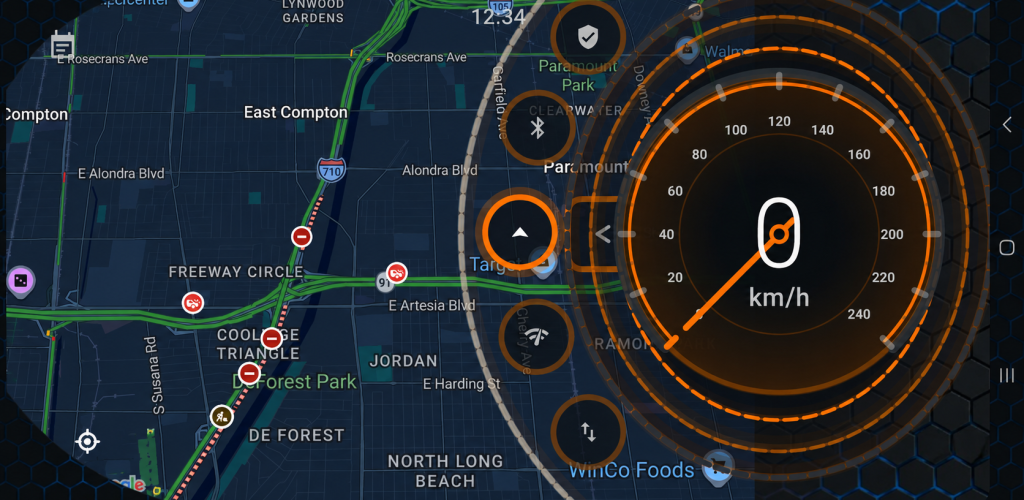
🚗 Navigation AI: Car Launcher turns your Android phone, tablet, or car display into a modern, customizable digital cockpit. Designed for in-car use, Navigation AI brings your map, GPS speed, driving instruments, favorite apps, and personalized vehicle interface together in one easy-to-use car launcher. Whether you use an Android head unit, multimedia display, tablet, or phone in your vehicle, you can create a cockpit that matches your car and the way you drive. 🚘 CUSTOMIZABLE CAR LAUNCHER Create a personalized home screen for your vehicle. • Customize your cockpit colors and visual style • Choose different backgrounds and themes • Add your own vehicle logo • Assign your favorite apps to quick-access shortcuts • Use layouts designed for both portrait and landscape screens Navigation AI gives your Android car display a cleaner and more focused driving interface. 🗺️ MAP + DIGITAL COCKPIT Use the map together with your cockpit or switch to a focused dashboard view when you want a cleaner screen. Choose between different display modes depending on how you want to use your vehicle screen. Your map, instruments, and shortcuts remain easily accessible from the main interface. ⚡ CUSTOM APP SHORTCUTS Access the apps you use most while driving without searching through your device. Long press a customizable shortcut and select an installed app from your device. You can create quick access to: • Navigation apps • Music apps • Phone and communication apps • Vehicle utilities • Other installed Android apps Build your own car launcher around the apps you actually use. 📊 DRIVING INSTRUMENTS Switch between different instrument views directly from the cockpit. Available instruments include: • GPS speed display • Compass • Clock • Acceleration display The central instrument panel is designed to keep important driving information easy to see. 🎨 PERSONALIZE YOUR DIGITAL COCKPIT Make your vehicle screen match your car and personal style. Navigation AI allows you to customize the interface with: • Adjustable accent colors • Multiple cockpit themes • Custom vehicle logos • Different background styles • Personalized shortcut assignments Create a unique cockpit for your own vehicle. 📱 PORTRAIT & LANDSCAPE SUPPORT Navigation AI is designed to adapt to different Android screens. Use it on: • Android car head units • Aftermarket multimedia systems • Android tablets • Android phones • Portrait car displays • Landscape car displays The interface automatically adapts to different screen orientations while maintaining the car-focused cockpit experience. 🎵 QUICK ACCESS FOR YOUR DRIVE Keep navigation, music, communication, and other useful apps close at hand. Navigation AI is designed around large visual controls and quick interaction, helping you access important functions from one central car launcher interface. 🚀 BUILD YOUR OWN CAR COCKPIT Navigation AI combines a customizable car launcher, digital dashboard, GPS speed display, map, driving instruments, vehicle personalization, and app shortcuts in one modern interface. Turn your Android vehicle screen into a cockpit designed around you and your car.
Navigation 1.0.3 Update
Navigation AI has been completely renewed. New V2 cockpit, TECH/LUXURY/SPORT/GRAPHITE themes, assignable app shortcuts, vehicle profile and logo selection, improved map performance, new driving instruments, better customization and note preservation during updates. Android 16 support added and ads removed.
Base APK: map3d.navigasyonfree.navigation.navigation.apk
Split APKs: config.en, config.mdpi
Size: 30.29 MB
What's New:
Navigation AI has been completely renewed. New V2 cockpit, TECH/LUXURY/SPORT/GRAPHITE themes, assignable app shortcuts, vehicle profile and logo selection, improved map performance, new driving instruments, better customization and note preservation during updates. Android 16 support added and ads removed.
APKFab.com and the download link of this app are 100% safe. All download links of apps listed on APKFab.com are from Google Play Store or submitted by users. For the app from Google Play Store, APKFab.com won't modify it in any way. For the app submitted by users, APKFab.com will verify its APK signature safety before release it on our website.