Dragon Anywhere

3.1 68

v1.96.00.0023 by Nuance Communications, Inc

Dragon Anywhere APK download Dragon Anywhere APK download

About Dragon Anywhere

Dragon Anywhere (Package Name: com.nuance.dragonanywhere) is developed by Nuance Communications, Inc and the latest version of Dragon Anywhere 1.96.00.0023 was updated on June 26, 2026. Dragon Anywhere is in the category of Productivity. You can check all apps from the developer of Dragon Anywhere and find 200 alternative apps to Dragon Anywhere on Android. Dragon Anywhere is listed in The 10 Best Audio to Text Apps. Currently this app is for free. This app can be downloaded on Android 10.0+ on APKFab or Google Play. All APK/XAPK files on APKFab.com are original and 100% safe with fast download.
Subscriptions to Dragon Anywhere Mobile are no longer available for purchase.
WHY USE DRAGON ANYWHERE
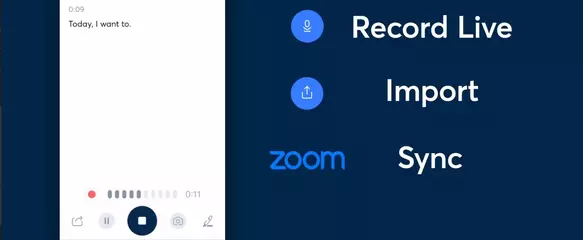
Paperwork doesn’t end when you’re away from your desk. Dragon Anywhere speech to text is the only mobile dictation app that enables continuous dictation of documents, with no length or time limits. This means, you can dictate documents of any length, edit, format, and share them directly from your mobile device to boost productivity anywhere—whether visiting clients, a job site or at your local coffee shop.
Mobile employees are often burdened with heavier documentation demands in the workplace—client intake forms, reports and more. Dragon Anywhere speech to text makes it easy to create detailed and accurate documents, fill out reports and forms, or complete other paperwork— all by voice, directly on your smartphone and tablet, and all on-the-go. And because you can also synchronize your personal customizations with Dragon Professional for the desktop, transcription work started in the field or out on the road can easily be completed back at your home or office.
DRAGON ANYWHERE FEATURES:
• Fast & accurate dictation means you can dictate immediately with 99% speech recognition accuracy right out of the gate, with no training required.
• No time or length limits for our voice to text means you can dictate as long as you want to complete documents of any length – from a business report to an entire book!
• Need to fill out forms from the road? Easily create professional form-based templates using Dragon Anywhere’s auto-texts feature and create and fill out forms, such as client in-take forms, and even navigate field to field by voice commands.
• Powerful customizations, like the ability to add words specific to your industry, means even more accurate transcription as you dictate documents. Or create simple voice commands to short-cut repetitive steps, like inserting an email signature or standard clauses into documents.
• Robust voice formatting and editing in our speech to text solution lets you select words and sentences for editing, correction, and deletion, apply common formatting like underline and bold, or voice navigate through fields of a report template.
• Synchronize with supported Dragon desktop speech to text solutions, so transcription work started on the road or in the field can be completed back at the desktop for seamless document workflows.
Additional Information:
• Dragon Anywhere supports the following languages: US English, Canadian English, UK English, French (Canada), French (France), and German
• Dragon Anywhere uses cloud-based speech recognition, and requires an internet connection to dictate.
• For any technical or subscription assistance with Dragon Anywhere speech recognition, please contact Nuance Support: https://www.nuance.com/dragon/support/dragon-anywhere-support.html
Dragon Anywhere has your privacy in mind:
• All communication with the cloud is secured with Enterprise grade encryption.
• The app does not require access to your personal information, and only requires access to the device’s microphone and storage for speech recognition
Privacy policy: https://www.nuance.com/about-us/company-policies/privacy-policies.html
Terms of Service: https://www.nuance.com/dragon/dragon-anywhere/eula.html

Dragon Anywhere 1.96.00.0023 Update

• As of July 1, 2026, Dragon Anywhere Mobile is no longer available for sale. Purchasing new subscriptions and renewing existing subscriptions is no longer possible..
• Resolved issue with the YouTube Tutorial video not playing as expected.
Read More
Dragon Anywhere Features
Related Articles More
Related Videos
Previous Versions More
Dragon Anywhere
Dragon Anywhere 1.96.00.0023 APK
July 3, 2026 59.33 MB

Requires Android: Android 10.0+

Architecture: arm64-v8a, armeabi-v7a, x86, x86_64

Screen DPI: 120-640dpi

SHA1: ab3595960e3f41cd8344456b16dffcec3b7e01da

Size: 59.33 MB

What's New:

• As of July 1, 2026, Dragon Anywhere Mobile is no longer available for sale. Purchasing new subscriptions and renewing existing subscriptions is no longer possible..
• Resolved issue with the YouTube Tutorial video not playing as expected.
Dragon Anywhere
Dragon Anywhere 1.95.00.0005 APK
November 3, 2025 59.35 MB

Requires Android: Android 10.0+

Architecture: arm64-v8a, armeabi-v7a, x86, x86_64

Screen DPI: 120-640dpi

SHA1: 0f53477bfa3923b71b0d5d60eda26d2f2b2a34d1

Size: 59.35 MB

What's New:

General improvements, including usability, stability, and security updates.
This release supports Android 10 and higher. Android 9 is no longer supported.
Dragon Anywhere
Dragon Anywhere 1.94.00.0104 APK
January 17, 2024 59.62 MB

Requires Android: Android 10.0+

Architecture: arm64-v8a, armeabi-v7a, x86, x86_64

Screen DPI: 120-640dpi

SHA1: 0a6cfc11a374387f90c3b43d5c97ee1407159436

Size: 59.62 MB

What's New:

General improvements, including usability, stability, and security updates.
This release supports Android 10 and higher. Android 9 is no longer supported.
Dragon Anywhere
Dragon Anywhere 1.93.00.0131 APK
May 22, 2023 59.11 MB

Requires Android: Android 10.0+

Architecture: arm64-v8a, armeabi-v7a, x86, x86_64

Screen DPI: 120-640dpi

SHA1: fba411d9491ba850b61a2683d53d77761955d739

Size: 59.11 MB

What's New:

General improvements, including usability, stability, and security updates.
This release supports Android 10 and higher. Android 9 is no longer supported.
The "Save to Evernote" command is no longer supported. To share a document with Evernote, use the Share Document menu option.
More Information

Update Date:

Latest Version:

1.96.00.0023

Need Update:

Submit latest version

Available on:

Google Play

Requirements:

Android 10.0+